
What are the big 3 of web development
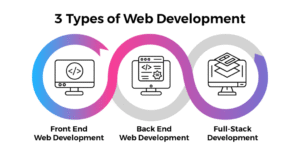
The big 3 of web development are HTML, CSS, and JavaScript, and they form the foundation of most modern websites.
HTML (HyperText Markup Language) creates the structure of a webpage. It sets up headings and paragraphs, images and links, forms too. Think of HTML as the skeleton. It gives the basic layout and organizes content so browsers can display it.
CSS (Cascading Style Sheets) is for styling. It controls things like colors and fonts, spacing and layout, and how a page adapts to phones or desktops. If HTML is the skeleton, CSS is the appearance. It makes the site look nicer and easier to use.
JavaScript adds interactivity and dynamic behavior. It powers animations and form validation. It runs sliders and pop-ups. It can also update things in real time so the page feels alive.
HTML builds the structure. CSS handles the look. JavaScript brings functionality. If you want to become a web developer, you need to learn all three.
HTML (hypertext markup language)-the skeleton:
The big 3 of web development are HTML, CSS, and JavaScript, and they form the foundation of most modern websites.
HTML (HyperText Markup Language) is often called the skeleton of an e-commerce website. It gives the basic structure that everything else sits on. On an online store, HTML decides how product listings, images, navigation menus and the checkout form show up in your browser. No HTML, no structure. You couldn’t browse or interact with products.
In e-commerce HTML makes sure elements are arranged so customers can find items, read descriptions and complete purchases. You can see how it works across five main areas: Introduction to HTML in E-commerce, Structure of E-commerce Pages, Key HTML Elements Used, Integration with Other Technologies, and Importance and Future Scope.
Introduction to HTML in E-commerce explains the basic role of HTML in building online stores. HTML is a markup language that uses tags to mark parts of a webpage like headings, paragraphs, images, links and forms. In an e-commerce site HTML builds the layout for pages such as the homepage, product pages, cart page and checkout page. It makes content look logical and organized.
Structure of E-commerce Pages looks at how HTML organizes a store. A typical site has a header, a navigation menu, a main content area, sometimes a sidebar, and a footer. The header usually has the logo and navigation links so users can move between pages. The main content area shows products, categories and details.
Key HTML Elements Used lists the tags and elements you see most in e-commerce. Headings from h1 to h6 for titles. Paragraph tags for descriptions. Anchor tags for links. Image tags to display product pictures, which really matter for customers. Lists to group features or categories. Forms for registration, login and checkout. Input fields, buttons and labels are HTML too. Semantic tags like header, section, article and footer help with readability and accessibility. These elements work together to make a site functional.
Integration with Other Technologies covers how HTML teams up with CSS and JavaScript. HTML gives the skeleton. CSS styles the site so it looks good. JavaScript adds interactivity, like filtering products on the fly and updating carts in real time. An Add to Cart button is made with HTML, then styled with CSS, then given behavior with JavaScript. HTML also ties into back-end systems and databases to show dynamic content such as product listings and user info. So HTML is the starting point that links everything else in web development.
Importance and Future Scope talks about why HTML still matters for e-commerce. Even with modern frameworks and no-code tools, HTML stays at the core of web content structure. It helps make sites accessible, search-friendly and compatible across devices and browsers. As online shopping grows, the need for well-structured, optimized sites will grow too. New HTML features and standards should keep improving performance and the user experience. HTML is not going away.
So, HTML is the backbone of an e-commerce site. It organizes content, sets up page layouts and lets users interact with the store. Used correctly with CSS and JavaScript, HTML helps developers build well-structured, accessible and efficient online shops. It’s a fundamental skill for anyone building shopping platforms.
CSS (cascading style sheets)-the styling:
How the Big 3 of Web Development Work Together
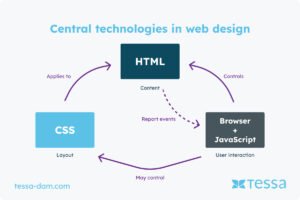
CSS (Cascading Style Sheets) is usually called the styling layer of an e-commerce site because it controls how the site looks and feels to users. HTML is the skeleton. CSS handles things like colors and fonts and the layout and spacing. It also determines whether the site adapts to different screens. Visual appearance matters for attracting customers, building trust, and nudging people to buy. A well-styled site looks professional and is easier to use. That helps conversion rates.
The role of CSS in e-commerce can be explained across five major areas. They are Introduction to CSS in E-commerce, Visual Design and Branding, Layout and Responsiveness, Advanced Styling Techniques, and Importance and Future Scope.
First, the introduction. CSS is a stylesheet language that defines how HTML elements are presented. It lets developers keep content separate from design, so updates are easier to manage. On an e-commerce site, CSS styles product pages and navigation. It tweaks buttons and controls how images and text appear. Keeping structure and style apart makes the site more flexible. Designers can change the look without touching the HTML. So yeah, CSS is what makes online stores look good.
Next, visual design and branding. Branding helps customers recognize a company and trust it. CSS lets designers keep colors and fonts consistent across the site so everything feels like it belongs together. A company might use the same color on buttons and backgrounds to match its brand. Typography settings make text readable and nicer to look at.
The third area is layout and responsiveness. This is about organizing content and making the site work on different devices. Modern e-commerce must adapt to phones and tablets and desktops. CSS gives tools like flexbox and grid plus media queries to build flexible layouts. Say product listings show in several columns on a desktop and then switch to a single column on a phone. Navigation menus get reworked for small screens.
Fourth, advanced styling techniques. CSS can boost interactivity and improve the user experience. Small things like hover effects and animations make the site feel alive. Hover over a product image and it might zoom or show more info. Buttons can change color when clicked to give feedback. CSS also supports dark mode and clean, card-style layouts.
Fifth, importance and future scope. CSS still matters for e-commerce development because users expect sites to both look good and work well. Designers use CSS to create modern, responsive layouts.
CSS turns a basic e-commerce site into something attractive, user-friendly, and professional. It controls the visual presentation, improves the user experience, and helps the site work across devices. Mix creative design with CSS skills and developers can build effective online stores. Together with HTML and JavaScript, CSS is a core part of web development.
Java script -the interactivity:
People often call JavaScript the “interactivity” layer of an e-commerce site. It brings pages to life. HTML gives the structure. CSS handles the styling. JavaScript adds user interaction and real-time updates. It also enables more advanced features. In e-commerce, interactivity matters. It makes shopping engaging and guides customers through the buying process.
It can lift conversion rates. Without JavaScript, online stores would be limited to static content. Modern things like live search and dynamic filtering would be hard to do. Interactive checkout systems wouldn’t work the way shoppers expect. They are Introduction to JavaScript in E-commerce, Dynamic User Interactions, Core Functional Features, Integration with Technologies, and Importance and Future Scope.
First, Introduction to JavaScript in E-commerce. It explains the basic purpose. JavaScript is a programming language that runs in the browser and lets developers build interactive, dynamic pages. On a store site JavaScript handles clicks and form submissions. Also navigation. Pages can respond instantly. No full page reloads needed.
Second, Dynamic User Interactions. This looks at how JavaScript improves engagement. A big part is real-time interaction. Users get instant feedback when they act. When someone types in a search bar, JavaScript can show suggestions right away. That helps them find products faster.
Things like sliders and pop-ups run on JavaScript and make the site feel more alive. Product zoom and image galleries make browsing smoother. All that keeps users exploring and makes the site easier to use.
Third, Core Functional Features. It explains the main functions JavaScript enables in e-commerce. One big example is the shopping cart, where users can add, remove.
contact details
Address
77, C2, St. Pauls Complex,
Pudukkottai Road, Opp. TELC Church – Head Post Office,
Tiruchirappalli, Tamil Nadu – 620001
Phone Numbers
- +91 90803 90025
- +91 76677 41236
Website
- s2swebtechnology.com