
Does NASA use WordPress

Yes, NASA uses WordPress. But it’s not that simple.NASA runs a huge digital setup. Hundreds of websites, apps and platforms. They do public outreach, share scientific data, run education sites and handle internal stuff. WordPress is part of that mix. Mostly for content-driven sites, blogs and communication portals. But it is not the only tech they use. They pick tools based on each project’s needs. You can look at this in five major areas. They are Introduction to NASA’s Web Ecosystem, Use of WordPress in NASA, Reasons for Using WordPress, Limitations and Alternative Technologies, and Overall Impact and Future Scope.
does nasa use wordpress
First, Introduction to NASA’s Web Ecosystem. This shows how big and complex their web presence is. Main public portal, mission pages, education platforms, research databases. Sites get lots of traffic and must give accurate science, stay secure and perform well. Some need heavy backend systems for data. Others just push news and updates. The web infrastructure is diverse and tuned to different needs.
Second, Use of WordPress in NASA. WordPress is used for content-heavy sites, blogs and comms platforms where quick updates matter. It lets non-technical staff — writers and editors — publish without deep programming skills. Blogs about missions or outreach programs may run on WordPress to share updates, images and articles. That makes content management easier and more accessible. Not every NASA site runs on WordPress, but it does show up in places where reliability and flexibility matter.
Third, Reasons for Using WordPress. One big reason is the user-friendly interface. Teams can manage content (easily) without always calling developers. WordPress is also customizable with themes and plugins, so it fits different site types. A large community and regular updates help keep it secure. It can scale to handle more content and traffic. So for many content tasks it makes practical sense.
Fourth, Limitations and Alternative Technologies. WordPress is powerful, but not right for everything. Complex apps that need advanced data processing, real-time systems or special security often use other solutions. For those needs NASA relies on custom-built systems, enterprise frameworks and other programming technologies. Those handle mission-critical work and large-scale data. WordPress is just one part of a bigger stack.
Fifth, Overall Impact and Future Scope. That NASA uses WordPress in some spots shows the platform can work beyond small sites. It proves WordPress has credibility and versatility. As tech changes, WordPress will likely stay useful for content management while other systems handle complex operations. The best choice always depends on what a project requires.
Bottom line. NASA does use WordPress, but as one piece of a larger and complex digital ecosystem. WordPress powers content-focused sites where ease, flexibility and fast updates matter. For advanced, mission-critical systems NASA turns to other tech and custom solutions. This mixed approach lets them use WordPress where it fits and other tools where needed.
Flagship site and more:
WordPress is one of the most used platforms for building websites. Small blogs. Big flagship sites for organizations. A flagship site is the main official website for a company, institution, or brand. It shows identity, services, and how they communicate with the public. WordPress can handle those sites because it’s flexible, scales well, and has a big ecosystem of themes and plugins. Lots of organizations use WordPress for their main site and also for blogs, landing pages, e-commerce stores, and internal portals. The idea of “Flagship Site and More” for WordPress breaks down into five areas. Intro to flagship sites in WordPress. Features that support large sites. Multisite and extra use cases. Performance and scalability. And future scope and value.
First, the intro to flagship sites in WordPress. A flagship site is the primary online presence for an organization. Users go there for core info, services, and updates. WordPress works well for that because it gives teams a solid content management system. Teams can publish and manage content without too much fuss. Organizations can make professional, attractive, and user-friendly sites that match their brand. The platform handles different content types — text, images, video, and interactive stuff — so it fits large, changing sites.
Second, features that support large websites. WordPress has customizable themes so organizations can make unique layouts and keep consistent branding. Plugins add features like SEO, security, analytics, and performance tweaks. Content tools let multiple people work together, with roles and permissions to keep control. It also supports multilingual content so sites can reach global audiences. Those things help when you have complex sites with lots of content.
Third, multisite and extended use cases. WordPress goes beyond a single site. WordPress Multisite lets you manage many websites from one install. Handy for groups that need separate sites per department, region, or project. A university might run one main site plus sub-sites for faculties and departments. Businesses can run their blog, campaign pages, and product sites alongside the main site. The point is WordPress can support a whole network of sites, not just one.
Fourth, performance and scalability. Flagship sites often get heavy traffic and need to load fast. WordPress can be tuned for performance with caching, CDNs, and good hosting. Developers can tweak code and optimize databases to handle big volumes of data. Security matters too. WordPress issues regular updates and supports security plugins to help protect sites. So WordPress can scale to meet the needs of large organizations.
Fifth, future scope and value. Digital presence keeps growing. Organizations want platforms that are powerful but still easy to use. WordPress keeps evolving with things like block-based editing and better performance tools. It’s also working with APIs and headless setups, which gives more development flexibility. The ability to run multiple sites and publish high-quality content makes WordPress useful for organizations of all sizes. It looks like WordPress will stay a key platform for flagship sites and more.
WordPress is a capable platform for flagship websites and a wide range of other digital properties. It’s flexible, it scales, and it has a large ecosystem. Using themes, plugins, and multisite, organizations can build online presences that fit their needs. As tech changes, WordPress will keep playing a role in web development and digital communication.
Headless CMS implementation:
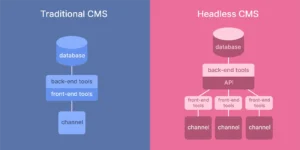
WordPress headless CMS implementation means using WordPress only as the backend content manager while the frontend is built with modern tools like JavaScript frameworks. In the usual setup WordPress does both backend and frontend. But with headless you split them up. Developers get more flexibility and better performance. And they get tighter control over the user experience. This approach is growing in web development, especially for large or high-performance apps. The idea breaks down into five main areas. They are Introduction to Headless CMS, Architecture and Working Process, Tools and Technologies, Benefits and Challenges, and Future Scope and Importance.
The first area, Introduction to Headless CMS, covers the basic idea. A headless CMS serves content through APIs instead of rendering pages on the backend. With WordPress that means you use it to create, manage, and store content. The frontend is built separately, with frameworks like React or Vue. So you can push the same content to a website, a mobile app, or even IoT devices. Headless WordPress is really about flexibility and sending content to multiple places.
The second area, Architecture and Working Process, looks at how it all fits together. WordPress sits on the backend and stores the content in a database. The frontend talks to WordPress using APIs such as the REST API or GraphQL to fetch content. When someone visits the site the frontend requests data and shows it dynamically. That setup can load faster because the frontend is optimized on its own. Developers often use static site generation or server-side rendering to boost speed and SEO. This explains the technical workflow of a headless CMS.
The third area, Tools and Technologies, lists the common tools. Frontend frameworks like React, Vue.js, and Next.js get used to build the interface. APIs like the WordPress REST API or GraphQL, often added via plugins, fetch the content. Some teams use static site generators such as Gatsby to build fast sites. Hosting platforms and content delivery networks improve performance and scalability. Headless WordPress relies on combining these modern technologies.
The fourth area, Benefits and Challenges, covers what you gain and what’s tricky. A big plus is better performance since the frontend can be tuned separately from the backend. You also get more design freedom and can use up-to-date development tools and frameworks. Security can be stronger because the backend is separate from the frontend. And content can reach multiple platforms. The downsides are real. It adds complexity and you need technical expertise. Managing two systems, frontend and backend, can be harder.
The fifth area, Future Scope and Importance, talks about why this matters going forward. User expectations are rising and apps are getting more complex. That pushes demand for flexible, high-performance solutions. Headless CMS architecture lets developers build faster, more scalable, and more dynamic apps. It works well for large organizations, e-commerce sites, and projects that span multiple platforms. As APIs and frontend tools improve, headless WordPress should keep growing in popularity. The approach points toward modern web development practices.
So WordPress headless CMS implementation separates content management from frontend presentation to give flexibility, speed, and scalability. You use WordPress as the backend and modern frameworks for the frontend to make advanced web apps. Yes, it takes more technical know-how, but for complex projects the trade-offs can be worth it. Headless WordPress looks set to shape the future of digital experiences.
Web modernization and scale:

WordPress web modernization and scale means updating and expanding WordPress sites so they meet today’s web expectations. Faster pages. Better security. Mobile-friendly layouts. The site also has to handle more traffic and more content as a business grows. WordPress is one of the most used content systems, so it has tools to help with that. From tiny blogs to big enterprise platforms, you can optimize WordPress to run fast and feel smooth for users. Think of it as five areas to focus on. Introduction to web modernization. Performance and scalability. Modern development practices. Infrastructure and security. Future scope and importance.
First, why modernize. Old sites often look dated, load slowly, or lack features. That can hurt users and search rankings. Modernization means updating design, technology, and site architecture so the site stays current. WordPress helps here. Block-based editing, better APIs, and support for modern frameworks make updates easier. Update themes, plugins, and the core. Keep the site relevant and competitive.
Second, performance optimization and scalability. This is about handling growth and big traffic spikes. Use caching and optimize images. Clean up the database. CDNs distribute content so users farther away don’t wait. Cloud hosting and scalable plans let a site grow without falling over. Pick lightweight themes and tidy code. Do these things and WordPress can scale to meet larger audiences.
Third, modern development practices. Developers use newer approaches to modernize sites. Headless setups are one example. WordPress runs the backend and a modern framework handles the frontend. CI/CD automates tests and deployments so updates are less risky. Teams use Git for version control. Responsive design makes the site work on phones and desktops. These practices speed up work and help the site meet modern expectations.
Fourth, infrastructure and security. A modern WordPress site needs a solid foundation. Good hosts offer automatic backups, server tuning, and security monitoring. Firewalls, SSL certificates, and timely updates protect against threats. Database tuning and server settings keep performance steady. Load balancing and redundancy help the site stay up during traffic spikes or if a server fails. All of that supports scale.
Fifth, future scope and importance. New tech—AI, automation, cloud services—keeps changing the web. WordPress is adding features that take advantage of those shifts. People want faster, safer, and more scalable sites, so modernization never really stops. WordPress will likely stay important because it’s flexible, has a big community, and keeps releasing updates. Companies that invest in modernization and scaling are better set for the future.
Bottom line. Modernizing and scaling WordPress means upgrading and tuning sites so they meet current and future needs. Focus on speed, modern development methods, and solid infrastructure. It takes work and planning. But the payoff is a faster, more secure, and more scalable site that works well as traffic and content grow. WordPress remains a strong choice for building and managing modern, scalable websites.