Is WordPress real coding?
Is WordPress real coding? A lot of beginners ask that when they start learning web development. WordPress is a Content Management System or CMS. It lets people build and manage sites pretty easily. It also powers more than 40% of websites on the internet. The confusion comes from two things. You can make sites without writing code. But WordPress itself is built with real programming languages like PHP, HTML, CSS, and JavaScript. So the answer depends on how you use it.
If you are starting out,can feel like no-code. You can pick a theme, add plugins, or use page builders like Elementor or Gutenberg and drag things around. You are not typing PHP or editing template files. You are using tools that someone else already coded. Low-code or no-code. That does not mean there is no code. Every feature and layout you see is controlled by programming behind the scenes.
Look under the hood and it gets clear. WordPress runs on PHP for server logic and it uses MySQL to store posts, pages, user info, and settings. On the front end there is HTML for structure, CSS for styling, and JavaScript for interactivity. When someone visits a site, those parts work together to show the page. So WordPress is fundamentally a coding system, even if many users never touch the code.
For developers it is definitely coding. You can build custom themes by creating files like index.php, style.css, and functions.php. You can write plugins in PHP to add or change features. You use hooks, filters, and APIs to hook into the core. That takes programming knowledge. In that setup you are writing logic, solving problems, and building systems like in other software work. That flexibility is why both beginners and big organizations use WordPress.
WordPress development is also a CMS, so it hides complexity behind a simple interface. You can write a post, upload images, or arrange pages without worrying about servers or databases. That ease of use comes from abstraction. Complex stuff runs in the background and you see only the simple controls. Still, every publish action or plugin install runs real code behind the scenes.
It supports both no-code and coding approaches. Beginners can get a site online fast without technical skills. Developers can dig in and customize deeply, tweak performance, or add things like e-commerce or membership features.
Relying only on plugins can sometimes limit what you can change or cause performance problems. Writing code needs care too, to avoid bugs. So pick the approach that fits your skills and what you need.If you use themes, plugins, and drag-and-drop tools and never write code, you are not doing traditional coding. But if you build themes, write plugins, or change functionality with PHP, HTML, CSS, or JavaScript, you definitely are coding. WordPress works both ways. You can start without code and move toward writing it as you learn.

WordPress Without Coding
At the beginner level WordPress works as a no-code or low-code platform. You can build sites with pre-built themes, plugins and drag-and-drop builders like Elementor or Gutenberg. You aren’t writing code. You’re using tools that already have code made by developers. That makes creating a website fast and simple and it opens the door for lots of people. So it’s not real coding since you’re not directly doing the programming
WordPress development
When you dig in past the basics, WordPress turns into a code platform. It runs on PHP, HTML, CSS and JavaScript. Developers use those languages to make custom themes. They also build plugins. And they change how a site works. They write logic and manage databases. They add features. This is actual development work now. It’s real coding when you work deep in WordPress.
How WordPress Works Behind the Scenes
Even if you don’t write code, WordPress runs on real code behind the scenes. PHP runs the server logic. MySQL stores the data. HTML gives the content its structure and CSS controls the layout. JavaScript adds interactivity. Every action, like loading a page or publishing a post, depends on these technologies. That shows WordPress is built on code.
Themes and Plugins in WordPress
Themes and plugins matter in WordPress. Themes set the design and layout. Plugins add features. You don’t need to code. Just install and use. But if you can code, you can build your own themes and plugins with PHP, CSS and JavaScript. It shows WordPress works for non-coders and developers.
Advantages of WordPress
Word press has a lot going for it for beginners and developers. It’s easy to use and it saves time. You don’t need technical skills to run a basic website. And for developers it’s still flexible, with plenty of ways to customize and add advanced features. That means it works for blogs and business sites. You can even use it for large applications.
1. Easy to Use and Beginner-Friendly
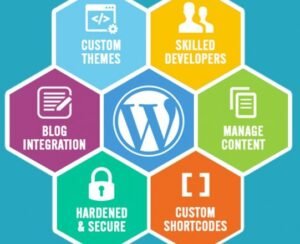
A big thing about WordPress is how easy it is to use. Even someone with no technical skills can make and run a website with it. The dashboard is simple. It feels intuitive. You can add pages. Write blog posts. Upload images. Manage content easily. You don’t have to code like with traditional web development. WordPress gives you a visual interface. So it’s great for beginners who want a site fast and don’t want to learn programming languages.
2. No Coding Required
Another thing about WordPress. You don’t need to know how to code to build a website. You can install themes and plugins. They change how your site looks and what it can do. Drag-and-drop page builders like Elementor and Gutenberg let you design pages visually. That no-code way saves time. You get to focus on content and creativity, not technical stuff. But if you want more control, WordPress also supports coding. So it works for all kinds of users.
3. Highly Customizable
it is very customizable, and that is one of its biggest advantages. There are thousands of free and premium themes you can use to change how your site looks instantly. Plugins let you add extra features. Contact forms for visitors, SEO tools, security systems, and e-commerce functionality are all available. Developers can also tweak the code, make custom themes, or build plugins. That flexibility means WordPress works for any site, from simple blogs to complex business applications.
4. Large Community Support
it has a massive global community of developers and designers, plus a huge base of users who help it grow. They offer help on forums and in tutorials. Lots of blogs and documentation too. Hit a problem? You can usually find a fix online. Help is there when you need it. That matters for beginners who often need guidance while building a site.
5. SEO-Friendly Platform
Search Engine Optimization (SEO) helps websites get seen. WordPress is built with SEO in mind. It generates clean, structured code. Search engines can read that easier. And there are SEO plugins like Rank Math and Yoast SEO. They help you tweak content and meta tags and check readability. WordPress also makes it simple to change URLs and headings. You can edit image alt text too. That helps sites rank higher in search results.

6. Mobile Responsive Design
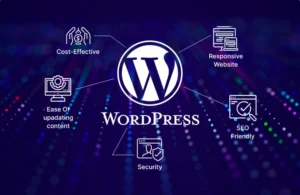
You need a site that works on phones. Most WordPress themes are responsive. They automatically adjust to different screen sizes like smartphones, tablets and desktops. That makes pages look and work right whether someone is on a phone or a desktop. A responsive design also helps your SEO since search engines favor mobile-friendly websites.

7. Cost-Effective Solution
WordPress is open source. That means it’s free to use. You only pay for hosting and a domain. There are lots of free themes and plugins. So building a site doesn’t cost much. Custom web development can get expensive. WordPress is a cheaper alternative and you still get good quality and functionality. Great for students, startups and small businesses.
8. Easy Content Management
WordPress is a content management system. You can create and edit content. And organize it too. Users manage blog posts and pages, plus categories and tags. The built-in editor does a lot. You can format text and add images. Or embed videos and schedule posts. It makes content management simpler and helps people keep sites up to date. Being able to update content easily is a big reason WordPress is so popular for blogging and content-based sites.
9. Strong Security Features
Security is a big worry for any website. WordPress gives tools and plugins to protect sites from threats. Plugins help stop hacking, malware and spam. WordPress also pushes regular updates so vulnerabilities get fixed and security gets better over time. You can add more steps too, like strong passwords, SSL certificates and backups. No platform is completely secure. WordPress provides enough tools to maintain a safe website environment overall.
10. Scalability and Flexibility
WordPress scales with your needs and traffic. Start with a simple blog. Later expand it into a full business site or an e-commerce platform. It handles large amounts of content and heavy traffic. Works for small sites and big ones. You can upgrade the site without moving to a new platform, and that saves time and effort in the long run.

Is WordPress real coding
It depends on how you use it and what you do with it. If you just install themes and plugins and never write code, then no, that isn’t coding. But if you build custom themes, write plugins, or change the code, then yes, that’s real coding. WordPress can work as both a no-code and a coding platform. That mix lets beginners get started easily. And it lets developers build advanced, professional websites.
wordpress