

Best Business Website in 5 Simple Steps
Best Business Website in 5 Simple Steps
Best Business Website in 5 Simple Steps Building a business website is easier than ever in 2026. With the right tools and a smartphone, you can create a professional website for your business in just a few simple steps.”
No matter if it runs tea, clothes, baked goods, or freelancing, any small venture gains ground fast through mobile site builders. Step one: pick a tool made for on-the-go creation – like SITE123 or Wix Mobile Editor – so setup feels natural, not forced. Suddenly, menus update during morning breaks, product shots go live between errands. OUR WEBSITE
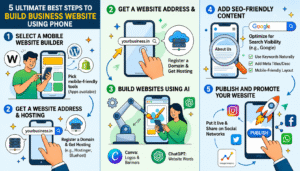
5 Ultimate Best Steps to Build Business Website Using Phone
Best Business Website in 5 Simple Steps
How to make a website for business
1. Select a mobile website builder
Start by picking a website builder easy for newcomers, one that runs well on phones. Some tools come with mobile apps, helping you build sites quickly without hassle.
Best Website Builders:
- Wix
- WordPress
- Shopify
Example:
On a phone, setting up pages for drinks, costs, and how to reach the shop becomes possible through Wix. Pages appear as the owner adds each detail without needing a computer. Mobile access makes updates happen during slow hours or right after opening. Each section builds slowly, shaped by what customers ask about most. Tools fit together without forcing any particular order. Info goes live once it feels ready, not before. How to make a website for business
2. Get a website address and place to store it online
A website address goes by another name – it’s called a domain. Take example.com, that kind of label points directly to your site online
- yourbusiness.in
- yourshop.com
For your site to stay up and reachable by users, getting web hosting is necessary. It runs behind the scenes so people can view pages anytime. Without it, what you build won’t go live at all.
Popular Hosting Providers:
- Hostinger
- Bluehost
Example:
Minutes after buying hosting on a phone, a bakery owner links it to WordPress through Hostinger. Connecting everything happens fast, without needing special tools or help from others. How to make a website for business
3. Build Websites Using AI
Starting out? Some software builds clean websites, even if you lack design skills. From the get-go, it picks shapes on screen, hues that fit, then offers words to include – no manual work needed.
Useful AI Tools:
- Canva for logos and banners
- Website words by ChatGPT
Example:
A shopkeeper who sells clothes might sketch a brand symbol through Canva while pulling together web page words with ChatGPT. Though creating visuals comes first, filling text spaces follows close behind – each tool handling its own piece without overlap. How to make a website for business
4. Add SEO-Friendly Content
Showing up easier on Google starts with straightforward content that speaks plainly about what you offer. A site built around real answers – what things cost, how they work, who provides them – is more likely to catch attention without tricks. Details like phone numbers, service features, or exact prices? They matter more than most expect. Simple facts pull weight when people search fast.
Important Website Pages:
- Home page
- About Us
- Services page
- Contact page
SEO Tips:
- Use keywords naturally
- Add meta titles and descriptions
- Use mobile-friendly layouts
- Optimize images for speed
Example:
A restaurant website can use keywords like:
“Best restaurant near me”
“Order food online”
Visibility online gets a boost, pulling in extra traffic by drawing eyes naturally. Reaching more people happens when presence grows without force. How to make a website for business
5. Publish and Promote Your Website
After finishing your site, put it live so people can visit. Then spread the word through social networks to bring in visitors. Once the website is ready, put it online so people can access it whenever they want. Publishing straight from your phone becomes possible using tools such as Wix or WordPress – tap once and it’s up. With the site active, spread the word across networks including Facebook, Instagram, along with WhatsApp.
How to make a website for business
Best Promotion Platforms:
Folks showing up might get noticed through,
- Google Analytics
 Google Analytics Official Website
Example:
Sharing a website link on WhatsApp Business helps local shop owners connect fast with people close by. Instagram works just as well for getting the word out locally. Messages spread quick when both apps are used together. How to make a website for business
Conclusion
Best Business Website in 5 Simple Steps
Best Business Website in 5 Simple Steps 5 , Start on your phone, tap into Wix or WordPress – no experience needed. One step at a time, shape pages that look sharp and work smooth. Canva helps design visuals while ChatGPT suggests words that connect. Move through each phase without rushing, let it unfold naturally. A clear site shows up faster than most expect. Done right, people notice, stay, return. How to make a website for business
“Visibility online gets a boost, pulling in extra traffic by drawing eyes naturally. Reaching more people happens when presence grows without force.”