
What Is Cloud‑Based Billing Software? A Practical Guide for Businesses
cloud based billing software is an online system that helps businesses create invoices, track payments and manage billing from anywhere. In this guide, we will see how it works, key features, benefits and how to choose the right tool for your company.

Benefits of Cloud Based Billing Software for Small Businesses
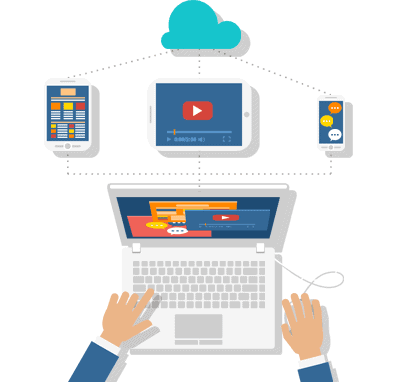
Cloud‑Based Billing Software refers to billing and invoicing solutions that are hosted on ‘remote servers’ (the “cloud”). It stores your billing data online and gives you access to it whenever you want, from wherever you are, as long as you have an internet connection.
Unlike traditional billing software that is installed locally on a system, cloud billing platforms are self-updating, perform data syncing in real-time, and have additional features, including recurring billing, GST/VAT billing, auto-reminders, and multi-user access.
Best for: small businesses, service companies, retail, agencies, subscription businesses, and any teams that require billing access on several devices.+

How Cloud Billing Software Works
So in this fast moving business environment there is no sense in managing customers and creating invoices, calculating taxes and tracking the payments manually. These businesses are shifting to digital invoicing and billing systems that simplify operations, reduce errors, and save valuable time. Create a customer profile, generate professional invoices or estimates from templates, perform automatic total and tax calculations, send the invoice digitally, track invoice payments, and generate reports with a click – all in a modern invoicing workflow.
This smart digital approach is a transformational change in the way businesses operate their billing and related financial records. This smart digital approach to managing billing and financial records is a paradigm shift, and it will transform the way businesses operate: Instead of relying on spreadsheets, paperwork, and manual calculations that take hours, a business owner can concentrate on growing the business and satisfying customers while the system does the technical work behind the scenes.
Creating a Complete Customer Profile:
The next step, therefore, after designing an invoice system, is creating a customer profile. This information includes the customer’s name, address, GST or VAT number, contact information, and the agreed payment terms. Therefore, the data maintained by the system is used to regulate the invoices to ensure all taxation requirements are met.
A digital system makes it possible to store all information about customers in one place safely. There is no longer a need to search for billing details in files or emails. A few clicks are enough to extract a customer’s data and instantly create invoices. This is important for returning customers as it minimizes the time spent entering data and the chance of errors during data entry.
Moreover, the need to store GST or VAT numbers along with the customer profile ensures that such documentation remains accurate and available at any time for compliance inspections. The payment terms like “Net 15,” “Net 30,” or advance payments can also be defined in advance so that invoices can transmit the message of the due payments to be made.
Generating Professional Invoices and Estimates Using Templates:
It is tedious and unreliable to prepare invoices from scratch every time. Digital invoicing tools offer professional invoice templates which can be configured with your company logo, branding, and necessary fields. This eradicates the possibility of invoices ever looking scruffy or unprofessional.
The same templates can be used for estimates or quotations. After the customer approves an estimate, there is no need to re-enter all the details to convert that estimate into an invoice. This economizes time and efforts and leaves less repetition of works.
They are bound to have fields for description of product or services, quantity, rate, discounts, tax percentage, and final total. Since everything is pre-formatted, one only requires adding the necessary details. It guarantees efficiency and accuracy.
Automatic Tax and Total Calculations:
One of the most difficult parts of manual invoicing is calculating taxes and totals correctly. A small mistake in calculation can cause financial discrepancies and compliance problems. However, digital invoicing prevents this risk by calculating taxes automatically, depending on configurations.
The tax rate such as GST, VAT, or any other that is applicable can also be set in the system. After creating an invoice, the system automatically applies the necessary tax percentage and recalculates the total amount. In case there are multiple tax slabs on products or services, the system can also determine them too.
Such automation is an excellent step towards ensuring precision and saving time for businesses that produce several invoices per day. Besides, it ensures accuracy in invoice creation, thus maintaining compliance with tax regulations when generating invoices and performing total payment calculations.
Sending Invoices Digitally:

After invoicing has been done, then the invoice can be sent electronically to the recipient. There is no need for physical printing and mailing of invoices. This is because the invoices can be e-mailed directly or even shared via WhatsApp messages. In addition, there are some software packages that enable clients to save their invoices in PDF files.
Sending invoices electronically saves time and ensures reliability. The method saves paper, which is environmentally friendly. Clients receive their invoices immediately and are able to pay for goods or services purchased. It also decreases paperwork.
The digital process enables users to easily access and retrieve documents at any time. Users can also determine whether the client has received, read, and saved their invoices.

Cloud‑Based vs Traditional Billing Software
Make your business better. Instantly.
Cloud‑Based
- Access anywhere
- Real‑time syncing
- Automatic updates & backups
- Subscription pricing (monthly/yearly)
- Better collaboration
Desktop/Offline
- Works without internet (in most cases)
- Data stored locally
- Manual updates/backups
- Usually one‑time license (sometimes)
- Harder for multi‑user access
ADVANTAGES OF OUR WEBSITE
Which a huge crowd utilizing mobile websites. Being the responsive website designing in Trichy, we provide a user-friendly website that loads graphics and is made easy to navigate, this is to grab user attention and make them retain till the entire content is delivered.
- Engage your audience with a better experience
- Have a user friendly website design
- Boost your sales drastically
- A lowered bounce rate website
- It saves you both time and cost
- Time and cost efficient
About Cloud-Based Billing Software
Cloud billing software is basically this online thing that lets businesses handle invoices and payments without needing to be in one place. It tracks sales too and makes dealing with GST a lot simpler since everything runs over the internet. I mean, compared to old school billing where you are stuck with paper or local computers, this one lets you pull up your data from pretty much anywhere, like on a phone or laptop when you are out. That accessibility part stands out, it seems. Businesses can automate a bunch of the boring stuff, so there are fewer mistakes from typing things wrong by hand, and it frees up time for other work.
Features wise, there is invoice creation that happens quick, and you can follow payments as they come in. Inventory gets managed somehow in there, and GST calculations just pop out automatically. Backups happen on their own, which is good because no one wants to lose data, and reports update in real time so you see what is going on right away. All that makes it feel essential for companies trying to keep up these days.
Small businesses use it a ton, along with retail spots and restaurants, even freelancers or service folks. It is secure enough that you do not worry about hacks, easy to figure out without much training, and cheaper than buying hardware. Overall, it boosts how efficiently things run, though I am not totally sure if every business needs all those extras. Some repetition in explaining the basics might help, but yeah, it improves efficiency in a noticeable way.