

Why Choose a Dynamic Website for Business Growth in 2026?
What is a dynamic website?
Introduction
Think about the last time you logged into a website, and it greeted you by your name, showed you recommendations based on what you browsed last week, or updated your feed without you refreshing the page. That experience? That’s what a dynamic website does. It’s not just showing you a fixed, pre-written page — it’s pulling information from a database, processing it in real time, and building a page tailored specifically for you, right at that moment.
“A dynamic website doesn’t just exist on a server — it thinks, responds, and adapts every time someone visits it.”
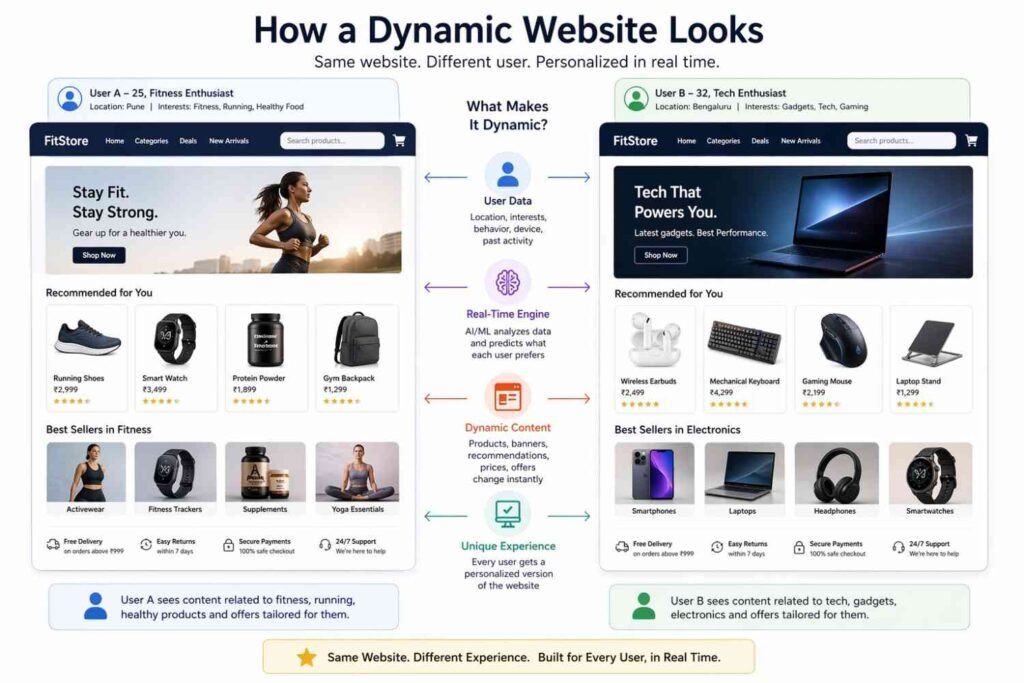
A static website is like a printed brochure. Whatever is printed on it is what you get, same for everyone who picks it up. A dynamic website is more like a conversation — it listens to who you are, what you want, and what you’ve done before, then responds accordingly. The content is generated on the fly, often pulled from a database, processed by server-side languages like PHP, Python, or Node.js, and then delivered to your browser.
The technology that makes this possible is a combination of front-end code (what you see) and back-end logic (what does the thinking). When you search for something on Google, Google doesn’t have a pre-written page for your query sitting on a server. It dynamically generates a results page based on your specific search, your location, your history, and thousands of other signals — all in under a second. That’s the real power of dynamic websites.
Businesses love dynamic websites because they can do things static sites simply can’t — like accept user registrations, process payments, remember your shopping cart, show personalized content, update prices automatically, or handle thousands of unique users all having completely different experiences at the same time. It’s essentially a living, breathing system rather than a digital poster on a wall.
In short, if a website treats you like an individual rather than just a visitor, it’s almost certainly dynamic. And in today’s internet, that’s not a luxury anymore — it’s the standard.
Technical behavior (what happens under the hood)
Content is assembled at request time: A dynamic site typically runs server-side code for every request, pulling fresh data and building the HTML before sending it to the browser. You don’t just “open a file”; you trigger a small program that runs on the server.
Content management and scale
CMS-driven pages: A dynamic site usually integrates a content management system so non‑developers can publish new articles, products, or landing pages without touching code. New entries automatically get their own “dynamic pages” with unique URLs.
User identity and state
Sessions and “remembered” state: Dynamic sites can use server-side sessions (often cookies or tokens) to keep track of who you are as you move from page to page—that’s why you stay logged in across different pages.
Interactivity and functionality
Forms that do something real: Contact forms, quote calculators, surveys, and “apply now” forms usually route data to a server-side app that validates, stores, or sends it onward — a hallmark of a dynamic site.
Integrations and APIs
Connects to other services: Dynamic sites often integrate with external APIs — payment gateways, shipping providers, email services, analytics tools, CRMs, social platforms — and use those responses to change what’s shown on the page.
Performance, caching, and trade-offs
More to do on each request (but can be mitigated): Because the server often runs logic and queries a database per request, dynamic pages can be slower than purely static HTML — though caching, CDNs, and edge compute can close much of that gap.
SEO, analytics, and experimentation
Programmatic SEO and landing pages: Dynamic sites can generate thousands of SEO-friendly pages programmatically (for cities, products, and categories) by combining templates with data, which is much harder with only static files.
Security considerations
More attack surface to protect: With databases, forms, logins, and APIs, dynamic sites must guard against SQL injection, XSS, CSRF, authentication bypass, rate limiting, and more. Static sites have fewer of these concerns.
Everyday examples beyond “personalization”
Online banking: Current balances, transaction history, and transfers are all dynamic and highly user-specific.
Airline or train booking: Schedules, seat maps, prices, and availability change constantly and are assembled per request.
In a nutshell
A dynamic website is a server-powered application that:
- Builds pages on demand using code and database queries, not static files.
- Maintains state (who you are, what you’ve done).
- Integrates with other systems via APIs.
- Supports real-time updates, search, filtering, and user-generated content.
- Offers flexibility for personalization, A/B testing, and programmatic scaling.
- Requires more infrastructure, maintenance, and security care than a purely static site.

Conclusion
A dynamic website is not just a technical upgrade from a static one — it’s a fundamentally different way of thinking about the web. Instead of showing every visitor the same fixed page, a dynamic website listens, adapts, and responds. It treats every visitor as an individual, pulling content from a database in real time and building a unique experience on the fly. In today’s internet, where users expect personalisation, speed, and interactivity as a baseline, dynamic websites aren’t a luxury reserved for big companies — they’re the standard that any serious business, blog, or platform needs to meet. If your website feels alive, remembers who you are, and changes based on what you do, that’s the power of dynamic technology working exactly as intended.
FAQ
What is the meaning of a dynamic website?
A dynamic website is a type of website where the content is generated in real-time, typically by a server or a database, and can change based on user input, time, location, or preferences.
Key traits of a dynamic website:
- Content is pulled from a database (e.g., MySQL, MongoDB)
- It uses server-side languages like PHP, Python, Node.js
- Pages are built on-the-fly for each visitor
- Supports user login, personalization, and real-time updates
Example: When you log in to Facebook, the feed you see is uniquely generated for you — that’s a dynamic website in action.
What is the difference between a dynamic and a static website?
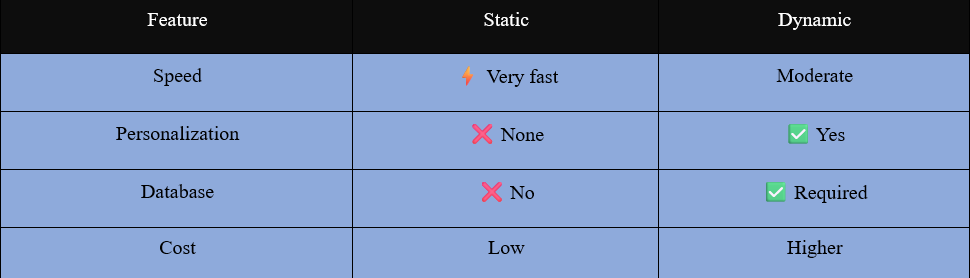
Static Website — Every visitor sees the same pre-built HTML files. No database, no server processing. Fast and cheap, but cannot personalize or update in real-time.
Dynamic Website — Content is generated per request using a database and server logic. Each user may see different content based on their profile, history, or preferences.
5 examples of dynamic websites
Introduction
Dynamic websites are everywhere — you use several of them every single day without even thinking about it. Here are five of the most well-known ones that perfectly show what dynamic really means in practice.
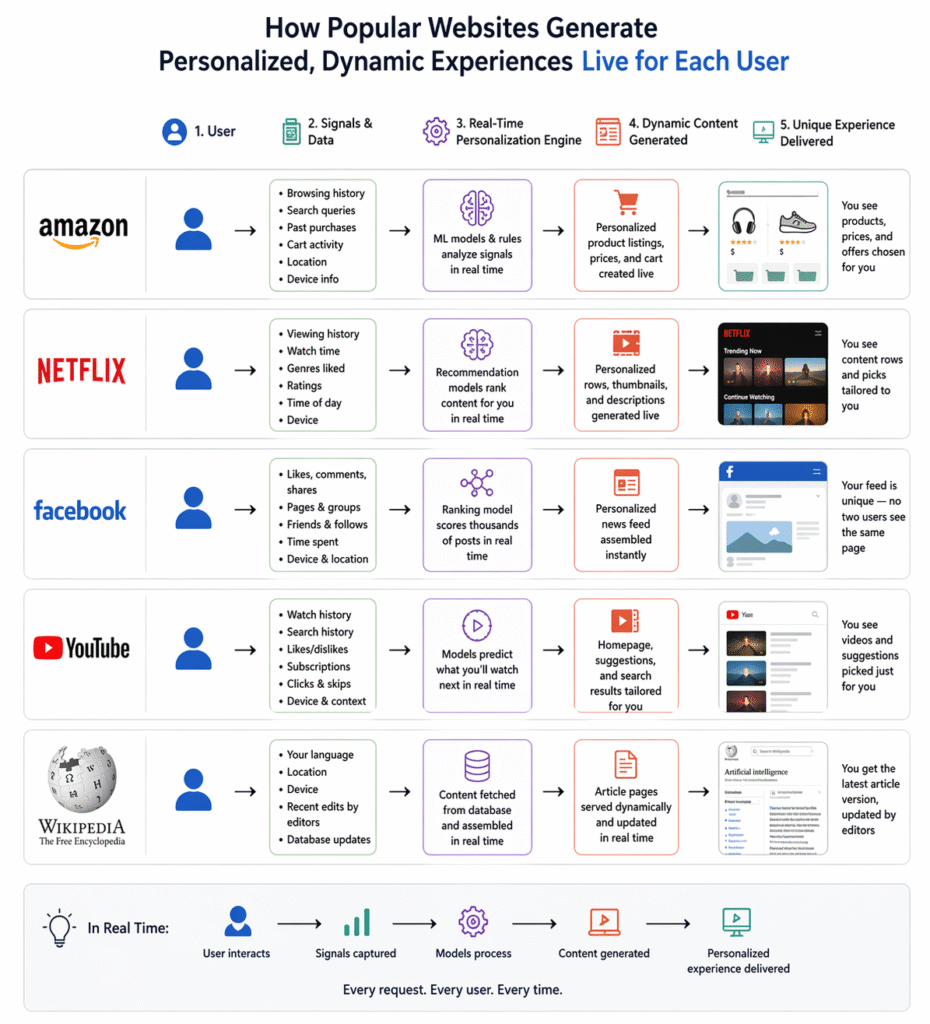
Dynamic websites constantly change their content based on user interaction, data, and real-time updates. Platforms like Amazon, Netflix, Facebook, YouTube, and Wikipedia are perfect examples because they generate unique experiences for every user instead of showing fixed content.
AMAZON

Amazon’s personalisation engine is the oldest and in many ways the most commercially consequential recommendation system ever built. The “customers who bought this also bought” feature alone, introduced in 1998, is estimated to drive around 35% of Amazon’s total revenue. Here’s how the entire system works today:
The scale Amazon is operating at:
Amazon has over 300 million active customer accounts, a product catalogue of over 350 million items, and processes millions of transactions every single day across dozens of countries. Every one of those customers who visits Amazon.in or Amazon.com sees a homepage, search results, and product pages that are uniquely assembled for them in real time. No two customers see the same Amazon — and that’s entirely by design.
What Amazon actually personalises
Personalisation on Amazon runs through almost every surface of the experience:
The homepage — When you land on Amazon, virtually nothing you see is generic. The hero banners, the product carousels, the “Inspired by your browsing history” rows, the “Pick up where you left off” section, the deals highlighted at the top — all of it is dynamically selected based on your individual profile. A customer who buys a lot of electronics sees a very different homepage from someone who mostly orders groceries or books.
Search results — This is one of the least understood parts of Amazon’s personalisation. When two people search for the same term — say, “running shoes” — they get the same pool of products but ranked in a different order. Amazon’s search ranking algorithm factors in your purchase history, your price sensitivity, your preferred brands, and even your location to reorder results in a way it predicts will be most relevant to you personally.
Product page recommendations — Every product page contains multiple recommendation modules: “Customers who bought this also bought,” “Frequently bought together,” “Similar items to consider,” “Customers who viewed this also viewed.” Each of these is dynamically populated and ranked based on a combination of global purchase patterns and your individual history.
Pricing and deals — Amazon changes prices on millions of products multiple times per day based on demand, competition, and inventory. While the base price is the same for everyone, the deals, coupons, and lightning deals surfaced to you are personalised based on your browsing and purchase history. If you’ve been browsing a product category, you’re more likely to see a deal for it.
Email and push notifications — “You left something in your cart,” “Price dropped on an item you viewed,” “New from a brand you follow” — all dynamically triggered by your specific behaviour, sent at times the system predicts you’re most likely to engage.
The recommendation engine: item-to-item collaborative filtering
Amazon actually invented and published the algorithm that powers much of modern recommendation technology — item-to-item collaborative filtering — back in 2003. The core insight was elegant: instead of finding users similar to you and recommending what they liked (which is slow and computationally expensive at scale), find items similar to the items you’ve already engaged with (which can be pre-computed and cached).
Here’s how it works in practice:
- Amazon builds a massive item similarity table by analysing purchase co-occurrence patterns across hundreds of millions of transactions. If a huge number of people who bought item A also bought item B, those two items have a high similarity score.
- When you visit a product page or your homepage, Amazon looks at your recent browsing and purchase history, finds the items most similar to those in its pre-computed table, and surfaces them as recommendations.
- Because the similarity table is pre-computed rather than calculated fresh each visit, this approach is fast enough to work at Amazon’s scale in real time.
The signals Amazon tracks
Amazon’s personalisation model is built from an extraordinarily detailed picture of customer behaviour, accumulated over years:
- Every product you’ve purchased, including category, price point, brand, and frequency
- Every product page you’ve viewed, and how long you spent on it
- Every search query you’ve entered, including ones where you didn’t click anything
- Products you added to your cart but didn’t buy — a strong signal of interest without commitment
- Products you added to your wishlist
- Your price sensitivity — whether you typically buy at full price, wait for deals, or use coupons
- Your review and rating history
- Your Subscribe & Save subscriptions, which reveal your consumption patterns for recurring purchases
- Your returns history — what you bought and sent back, and why
- Your delivery address, which informs regional relevance
- What device and browser you’re using
- Time of day and day of week patterns in your shopping behaviour
The “customers who bought this also bought” system
This specific feature deserves its own explanation because it’s both the oldest and still one of the most powerful parts of Amazon’s recommendation engine.
The system works by mining purchase co-occurrence data across the entire Amazon customer base. If a statistically significant number of people who bought a DSLR camera also bought a particular memory card and camera bag, Amazon’s system registers those as strongly associated items and surfaces them together — both on the product page and at the cart and checkout stages.
What makes this powerful is that it’s self-reinforcing. As more people follow the recommendation and buy the associated items together, the co-occurrence signal gets stronger, which makes the recommendation appear more prominently, which drives even more co-purchases. Over time this produces extremely reliable “bundle” suggestions that feel almost prescient — because they’re based on the real behaviour of millions of customers before you.
Personalised pricing signals and urgency cues
Amazon is sophisticated about surfacing the right urgency and scarcity signals to the right customers. “Only 3 left in stock,” “Deal ends in 2 hours,” “This item is in 47 people’s carts right now” — these aren’t just static labels. The system decides which urgency cues to show and how prominently to display them based on what it knows about your decision-making patterns. Customers who have historically responded to scarcity signals see them more prominently. Customers who are more price-driven see deal countdowns more often.
New customer cold start
One of the hardest problems in any recommendation system is what to do with a brand new customer — someone with no history. Amazon solves this in several ways. First, it uses your first few clicks and searches in a session to build an immediate in-session profile, dynamically updating recommendations within minutes of your first interaction. Second, it uses demographic and geographic signals to make educated guesses — a new user registering from a particular city or browsing on a particular device type gets mapped to a rough population segment whose preferences are known. Third, it falls back to globally popular products and trending items in relevant categories until enough personal data accumulates.
The feedback loop between recommendations and inventory
Perhaps the most underappreciated aspect of Amazon’s personalisation is how it connects to the supply chain. Because Amazon can predict with reasonable accuracy what specific customer segments are likely to buy — based on browsing patterns, seasonal trends, and recommendation click-through data — it uses those predictions to pre-position inventory in the warehouses geographically closest to those customer segments. This is why Amazon can often deliver within hours: the product was already near you before you even decided to buy it, because the recommendation system predicted you might.
Why it all matters commercially
Amazon’s personalisation system is not a convenience feature — it is a core revenue engine. The 35% revenue attribution figure for recommendations means that more than a third of everything Amazon sells is driven by “you might also like this” suggestions rather than direct search or intent. Every percentage point improvement in recommendation relevance translates directly into hundreds of millions of dollars in additional sales. This is why Amazon has invested in personalisation research more heavily and for longer than almost any other company on earth — the commercial return is immediate, measurable, and enormous.
The result is a version of Amazon that is genuinely different for every single customer — shaped by years of purchase history, browsing behaviour, and preference signals into a store that feels, at its best, like it was built specifically for you.
Amazon uses dynamic systems to handle millions of users and products at the same time. Every time you search for a product, the results are generated instantly based on your preferences, ratings, popularity, and availability. Even the homepage layout changes depending on what you recently searched or bought. This makes shopping faster and more personalized.
Another important dynamic feature of Amazon is its real-time inventory and pricing system. Product prices may change within minutes depending on demand, competition, or stock levels. Delivery estimates also update dynamically based on your location, selected items, and shipping speed. This ensures users always see the most accurate and relevant information.
NETFLIX

Netflix’s personalisation system is one of the most studied and written-about recommendation engines in the world — and for good reason. It influences over 80% of what people actually watch on the platform. Here’s how it works in depth:
The scale of the problem
Netflix has over 270 million subscribers across 190 countries, a library of thousands of titles, and multiple profiles per household. Every one of those subscribers opens Netflix expecting to find something worth watching within about 60–90 seconds — Netflix’s own research shows that if you haven’t found something in that window, you’re likely to close the app. The entire personalisation system is engineered around solving that 60-second problem.
What Netflix actually personalises
Most people think of Netflix personalisation as just “the recommendation rows.” In reality, personalisation runs much deeper than that:
The rows themselves — The categories shown on your homepage (and their order) are dynamically chosen for you. One user might see “Because you watched Mirzapur” at the top. Another sees “Critically acclaimed dark dramas.” A third sees “Watch in one sitting.” These row labels and their contents are assembled fresh from your viewing history every time you load the app.
The titles within each row — Even within a standard row like “Top 10 in India today,” the order of titles is personalised. Two users in the same city see the same titles but ranked differently based on their individual taste profiles.
Thumbnails — This is the most surprising one. Netflix maintains multiple artwork options for most titles — sometimes over 20 different thumbnail images for a single show. The system dynamically selects which thumbnail to show you based on what it predicts will resonate with your taste. If you watch a lot of films featuring strong female leads, you might see a thumbnail centred on a female character for a title that another viewer sees as an action-focused image. The thumbnail you see is chosen specifically to speak to your demonstrated preferences.
Search results — Even when you search for a genre like “thriller,” the results are ranked and ordered according to your personal taste model, not just by popularity.
A/B testing at massive scale
Everything on Netflix’s interface is constantly being tested. The system runs hundreds of A/B experiments simultaneously — testing different row orders, different thumbnail styles, different homepage layouts, different ways of presenting new releases. Because Netflix has 270 million users, even a small experiment can reach millions of people and produce statistically significant results within days. This means the interface itself is dynamic and evolving — your Netflix homepage today is the product of thousands of past experiments, all optimised toward getting you to start watching something you’ll finish and enjoy.
Why this matters beyond convenience
Netflix has stated that its recommendation system saves the company over a billion dollars annually in reduced churn — meaning people cancel their subscriptions less often because they consistently find content worth watching. Personalisation isn’t just a feature for Netflix; it’s a core part of the business model. A subscriber who always finds something good to watch is a subscriber who keeps paying.
The deeper implication is that no two Netflix subscribers are really using the same product. The titles, the artwork, the row order, the search results — all of it is dynamically assembled into a version of Netflix that exists only for you, rebuilt from scratch on every visit, shaped by every watch decision you’ve ever made on the platform.
Netflix is a strong example of personalization through dynamic content. Each user sees a completely different homepage, even if they use the same account on different profiles. The system tracks viewing history and adjusts recommendations instantly, helping users discover content they are more likely to enjoy.
Netflix also uses dynamic technology to improve streaming performance. Video quality automatically adjusts based on your internet speed, preventing buffering. Features like “Continue Watching” and personalized thumbnails update in real time, creating a smooth and customized viewing experience.

Facebook’s News Feed is arguably the most complex personalisation system ever built for a consumer product. Here’s how it actually works:
The core problem Facebook is solving
The average Facebook user has hundreds of friends, follows dozens of pages, and is connected to multiple groups. On any given day, those connections might generate thousands of potential posts. Facebook’s job is to pick roughly 200–300 of them and rank them in an order that keeps you engaged. That selection and ranking happen fresh, every single time you open the app.
The four-stage pipeline
Stage 1 — Inventory: Facebook first collects every single post, story, reel, ad, and suggested content piece that could appear in your feed at that moment. This pool can be tens of thousands of items from your friends, followed pages, groups, and Facebook’s own content recommendations.
Stage 2 — Signals collection: For each candidate post, Facebook gathers hundreds of signals about you and the content:
- How often you interact with that person or page
- What type of content you typically engage with (video, photos, links, text)
- How long you’ve historically spent looking at similar posts
- How many of your friends have already engaged with it
- How recent the post is
- What device you’re on and how fast your connection is
- What time of day it is and your typical usage patterns at that time
Stage 3 — Scoring and ranking: A series of machine learning models score every candidate post against your personal signals. Each model specialises in predicting a different outcome — one predicts whether you’ll click, another predicts whether you’ll comment, another predicts whether you’ll share, and critically, one predicts whether you’ll later tell Facebook the post was worth seeing. These scores are combined into a single relevance score per post.
Stage 4 — Final filtering: Before the feed is assembled, Facebook applies a set of rules to ensure diversity and integrity. It won’t show you five posts from the same person in a row. It limits how many ads appear consecutively. It filters out content that violates community standards. It tries to balance content from friends versus pages versus groups based on what mix you’ve historically preferred.
What Facebook actually optimises for?
This is the most important and most debated part. Facebook doesn’t just optimise for clicks — it uses a metric called meaningful social interaction (MSI). Posts that generate comments and shares between friends are weighted far more heavily than posts that just get passive likes or views. The logic is that a post sparking a real conversation between two people is more valuable than one that gets scrolled past with a quick reaction.
The downside, which Facebook has publicly acknowledged, is that emotionally charged content — anger, outrage, controversy — tends to generate more comments and shares than calm, neutral content. So the algorithm unintentionally amplifies heated posts simply because they drive more of the interaction signals it values.
Real-time feedback loops
Your feed is not static even after it loads. As you scroll, Facebook’s system is watching — how long you paused on each post, whether you expanded a photo, whether you hovered over a link without clicking. This micro-behaviour feeds back into the ranking model in near real time, so posts further down your feed are already being re-ranked based on what you did at the top.
If you pause on a video for three seconds and then scroll away, that’s logged differently than if you watched it for 45 seconds. If you click on a post but then immediately come back, that bounce signal tells the algorithm the content didn’t satisfy you — and it will show you less of that type going forward.
Why no two feeds are ever identical
Even if you and a friend have identical friend lists and follow the same pages, your feeds will look completely different. Every interaction you’ve ever had on Facebook has shaped a personal model of your preferences — weighted by recency, frequency, and depth of engagement. That model is unique to you, and it’s what the ranking system uses to assemble your feed from scratch on every single visit.
Facebook’s News Feed is, at its core, a live machine learning inference system running personalised predictions about your behaviour — rebuilding your experience of the internet from the ground up, every time you open it.
Facebook relies heavily on dynamic content to keep users engaged. The news feed is generated every time you open the app, showing posts based on your activity, interests, and interactions. Notifications, messages, and comments update instantly without needing to refresh the page.
In addition, Facebook dynamically controls what content you see through its algorithm. It prioritizes posts from friends, groups, or pages you interact with the most. Advertisements are also personalized in real time, making the platform highly responsive and user-specific.
YOUTUBE

YouTube is another powerful dynamic website that adapts to user behaviour. The homepage recommendations, search results, and suggested videos all change based on what you watch, like, or skip. This keeps users engaged by constantly updating content to match their interests.
YouTube also supports real-time features such as live streaming, where video playback, chat messages, and viewer counts update instantly. Even advertisements and video suggestions at the end of a video are dynamically selected for each user.
YouTube’s recommendation system is one of the most sophisticated dynamic personalisation engines ever built. Here’s how it actually works:
The two-stage recommendation pipeline
YouTube doesn’t scan its entire library of 800 million+ videos every time you open the app — that would be impossibly slow. Instead it uses a two-stage funnel:
Stage 1 — Candidate generation: A neural network looks at your watch history, search history, liked videos, and demographic signals, then narrows the entire YouTube library down to a few hundred videos that might be relevant to you. This stage prioritises speed over precision.
Stage 2 — Ranking: A second, more powerful neural network takes those few hundred candidates and scores each one against dozens of signals — predicted watch time, predicted click-through rate, freshness, diversity, and many more. The top-ranked videos become your homepage feed and sidebar suggestions.
The signals YouTube tracks
Every interaction you have feeds back into the system in real time:
- How long you watched a video (watch time matters far more than clicks)
- Whether you watched it to the end or abandoned it mid-way
- Videos you searched for, even if you didn’t click them
- What you watch right after a video — a strong signal of satisfaction or dissatisfaction
- Your implicit signals like pause, replay, and scroll-past behaviour
- Time of day, device type, and even your current location
Why your homepage is never the same twice
When you open YouTube, the page is assembled fresh from scratch. The system checks what you watched in the last session, what’s trending in your region right now, what creators you’ve engaged with recently, and what people with similar taste profiles to yours have been watching — then builds a unique grid just for you, in that moment.
The “rabbit hole” problem
YouTube’s algorithm optimises heavily for watch time — it wants you to keep watching. This is why recommendations often pull you deeper into whatever topic you just watched. If you watch one video about a subject, the next several suggestions will be progressively deeper into that topic, because the model predicts that’s what will hold your attention longest.
Thumbnails and titles are dynamic too
Like Netflix, YouTube A/B tests thumbnails automatically. Creators can upload multiple thumbnail options, and YouTube dynamically serves different ones to different users based on which version its models predict will get the highest click-through rate from that specific viewer.
Fresh content gets a temporary boost
New videos from channels you’re subscribed to get artificially surfaced in your feed for a short window — even before the algorithm has enough engagement data to rank them naturally. This ensures subscriptions still feel meaningful even in an algorithm-dominated feed.
In essence, every time you open YouTube, it’s running thousands of model predictions about you specifically — and assembling a page that exists for no one else on earth.
WIKIPEDIA

Wikipedia may appear simple, but it is also dynamic because its content is stored in databases and updated continuously. When users edit an article, the changes become visible almost immediately. This allows information to stay current and relevant without manual page updates.
When you request a page, Wikipedia doesn’t serve a pre-written HTML file. Instead, it runs a process in real time:
- Your browser sends a request to Wikipedia’s servers — say, for the article “Black hole.”
- Wikipedia’s back-end (built on MediaWiki, an open-source PHP framework) receives that request and queries a MySQL/MariaDB database where all article text, edit history, images, and metadata are stored.
- The database returns the raw wikitext (Wikipedia’s own markup language), and MediaWiki parses and renders it into HTML on the fly, then sends that finished page to your browser.
What makes it genuinely dynamic:
- Any editor anywhere in the world can update an article right now, and the very next visitor sees the new version — no file upload, no deployment. The change hits the database, and the next page render picks it up instantly.
- The same article renders differently depending on whether you’re logged in, what language you’re using, whether you’re on mobile or desktop, and what your display preferences are.
- Features like search suggestions, recent changes feeds, user watchlists, talk pages, and edit diffs all pull from the database dynamically per request.
How Wikipedia handles the scale:
Wikipedia gets hundreds of millions of page views daily, so serving every page from a live database query would be incredibly slow without smart caching. They use:
- Varnish and ATS (Apache Traffic Server) as caching layers — frequently accessed pages are cached so the database isn’t hit every single time.
- Memcached for storing parsed content in memory so repeated renders of the same article are fast.
- CDN (Content Delivery Network) to serve cached pages from servers geographically close to the user.
So in practice, popular articles like “World War II” are often served from cache — but the source of truth is always the dynamic database, and any fresh edit instantly invalidates the cache for that article, triggering a new live render.
Conclusion
Amazon, Netflix, Facebook, YouTube, and Wikipedia aren’t just the biggest websites in the world — they’re the clearest proof of what dynamic technology can achieve at scale. Each one has built something that would be completely impossible with static pages: a store that knows your shopping habits, a streaming platform that predicts your next favourite show, a social feed that assembles itself fresh every visit, a video engine that tailors every recommendation to your history, and an encyclopaedia that updates in real time as the world changes. What unites all five is the same core idea — the page you see was built for you, at that moment, from a live database. That’s the promise of dynamic websites, and these five examples show just how far that promise can go when it’s executed at the highest level.
FAQ
- What is an example of dynamic website?
Classic examples of dynamic websites include:
- Facebook / Instagram — personalised social feeds per user
- Amazon — product listings, pricing, and recommendations change in real-time
- Netflix — homepage and suggestions are unique to every subscriber
- YouTube — recommended videos depend on watch history
- Gmail — inbox content is live and user-specific
Any website where users log in, search, or see personalised content is almost certainly dynamic.
- Is Amazon a dynamic website ?
YES, Amazon is a dynamic website.
Amazon is one of the most sophisticated dynamic websites in the world. It uses:
- Real-time price updates based on demand and competition
- Personalised product recommendations (AI-driven)
- Live inventory and stock data from databases
- User-specific cart, wishlist, and order history
- Dynamic search results ranked by relevance and sponsored listings
- Is Netflix a dynamic website?
YES, Netflix is a fully dynamic website.
Netflix is a prime example of dynamic web technology:
- The homepage layout and featured titles change per user
- Netflix’s recommendation engine (machine learning) customises rows like “Because you watched…”
- Continue Watching and watch history are stored dynamically per account
- Multiple user profiles within one account each have unique dynamic content
- Content availability varies dynamically by country/region
- What are the five examples of websites?
Websites come in many types. Five broad examples:
- E-Commerce— Amazon, Flipkart, eBay (sell products online)
- Social Media— Facebook, Instagram, Twitter/X (connect people)
- Streaming / Entertainment— Netflix, YouTube, Spotify
- News & Blogs— BBC, TechCrunch, Medium
- Business / Portfolio— Company websites, personal portfolios (often static or hybrid)
- What are the 12 types of websites?
The 12 most recognised types of websites are:
- E-Commerce (Amazon, Shopify stores)
- Blog / Content (WordPress blogs, Medium)
- Portfolio (designers, photographers)
- Business / Corporate (company homepages)
- Landing Page (single-page marketing)
- Social Media (Facebook, LinkedIn)
- News / Magazine (BBC, Forbes)
- Educational / eLearning (Udemy, Coursera)
- Forum / Community (Reddit, Stack Overflow)
- Streaming / Entertainment (Netflix, YouTube)
- Government / NGO (official portals)
- SaaS / Web App (Gmail, Notion, Figma)
How much does a dynamic website cost?
INTRODUCTION
This is one of the most common questions businesses ask, and honestly, there’s no single answer — because the cost of a dynamic website depends enormously on what you want it to do. A simple dynamic website with user login and a database can cost significantly less than a full-blown e-commerce platform with payment gateways, inventory management, and real-time analytics.
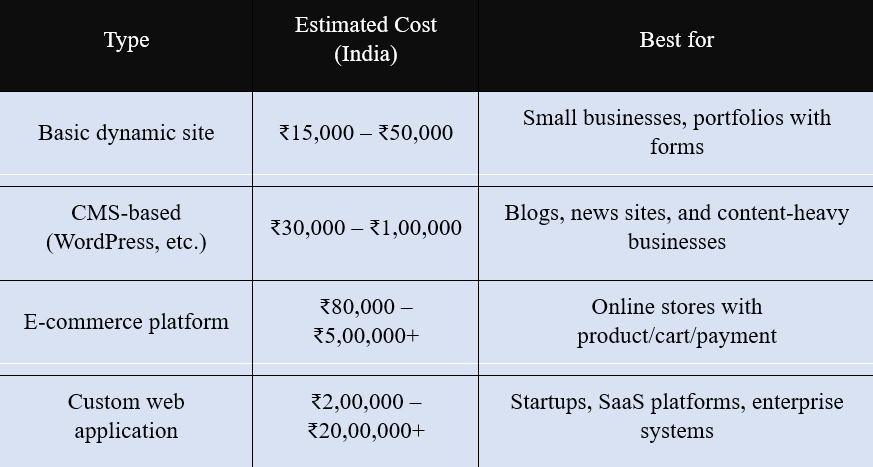
If you’re a small business looking for a basic dynamic website — say, a site where visitors can fill out a contact form, book an appointment, or log into a customer portal — you’re probably looking at somewhere between ₹15,000 and ₹80,000 in India, depending on the developer you hire and the complexity of features. That’s the entry-level range and it’s quite accessible for most small businesses today.
What’s actually included in the cost?
When a developer quotes you a price for a dynamic website, it’s worth understanding exactly what that number covers — because two quotes of the same amount can include very different things. A complete dynamic website build typically involves several layers of work: UI/UX design (wireframes, mockups, and visual design), front-end development (the code that renders the design in a browser), back-end development (the server logic, database structure, and APIs), and quality assurance testing across devices and browsers. Some developers quote only the coding work and leave design as a separate cost. Others include a round of revisions but charge extra for anything beyond that. Always ask for a detailed scope of work before signing anything — a vague quote is often a recipe for unexpected additional charges midway through the project.
Freelancer vs agency vs in-house — which is right for you?
One of the biggest factors determining your final cost is who you hire to build the site. Freelancers are typically the most affordable option — a skilled independent developer in India might charge ₹15,000 to ₹80,000 for a small to mid-sized dynamic project, and they’re often a great fit for straightforward builds with a clear scope. Digital agencies cost more — typically ₹80,000 to ₹5,00,000 and above — but they bring a full team: a designer, a developer, a project manager, and sometimes an SEO or content specialist. For complex projects with multiple moving parts, the structured process an agency offers is often worth the premium. In-house developers are the most expensive route upfront (full-time salaries plus benefits), but make sense for businesses that need continuous development and updates rather than a one-time build.
Hidden costs most people forget to budget for
The quoted build cost is rarely the full picture. There are several recurring and one-time costs that businesses consistently underestimate when planning a dynamic website. Domain registration typically costs ₹800 to ₹2,000 per year depending on the extension (.com, .in, .co.in). Hosting for a dynamic site — which needs a server capable of running code and a database — runs anywhere from ₹3,000 to ₹30,000 per year depending on traffic volume and the hosting provider. SSL certificates (which give your site the padlock icon and are essential for any site handling user data) can cost ₹0 to ₹10,000 per year depending on the type. Premium plugins, themes, or third-party API subscriptions (payment gateways, SMS services, map integrations) add further recurring fees. And then there’s content — copywriting, photography, and graphic design are separate costs that many businesses forget entirely until the development is nearly finished.
How complexity drives cost — a practical breakdown
The single biggest driver of cost in a dynamic website is the complexity of its features. Every interactive element — a login system, a booking calendar, a product filter, a live chat widget, a membership tier, a real-time inventory counter — requires back-end logic, database design, and testing. A contact form might take a few hours to build. A full user authentication system with password reset, email verification, and role-based access control might take several days. A payment integration with Razorpay or PayU, including order management and automated invoicing, could take a week or more. When you’re reviewing a quote, ask the developer to break down the cost by feature — this helps you prioritise what’s essential for launch versus what can be added later, and often reveals significant savings if you’re willing to phase the build.
The cost of getting it wrong
One of the most overlooked costs in web development is the price of a poorly built website. A dynamic site built on a fragile codebase — with security vulnerabilities, no documentation, or spaghetti logic that only the original developer understands — can end up costing far more to fix or rebuild than it would have cost to do properly the first time. This is especially common when businesses choose the cheapest available option without vetting the developer’s portfolio or asking for references. A website that goes down during a product launch, gets hacked because of outdated plugins, or becomes impossible to update because the code is a mess — these are real business costs that dwarf the original development invoice. Investing a little more upfront in a reputable developer with a clear process and clean code pays dividends for years.
Should you build or use a SaaS platform?
For many small and medium businesses in India, the smartest answer to “how much does a dynamic website cost?” is actually: consider not building a custom one at all — at least not initially. Platforms like Shopify (for e-commerce), Wix or Squarespace (for business sites), or Webflow (for design-heavy sites) are themselves dynamic platforms that give you 80–90% of the functionality of a custom dynamic site at a fraction of the cost. Shopify plans start around ₹1,500 per month. These platforms handle hosting, security, updates, and many integrations automatically — removing most of the ongoing maintenance burden. The trade-off is limited customisation and ongoing subscription fees rather than a one-time build cost. For businesses that are still validating their model or don’t have complex custom requirements, starting on a platform and migrating to a custom build later is often the most financially sensible path.
Return on investment: the right way to think about cost
Ultimately, the cost of a dynamic website should always be evaluated against what it’s designed to generate. A ₹2,00,000 e-commerce website that processes ₹50,000 in orders every month has paid for itself in four months and generates pure return after that. A ₹50,000 dynamic booking website for a clinic that fills three extra appointments per week at ₹800 each has paid for itself in under five months. The question businesses should be asking isn’t “how do I spend the least on a website?” but “what level of investment makes sense given the revenue or value this site will generate?” Framing the budget decision around return on investment rather than upfront cost alone almost always leads to better outcomes — both for the business and for the quality of the final product.
Timeline and how it affects cost
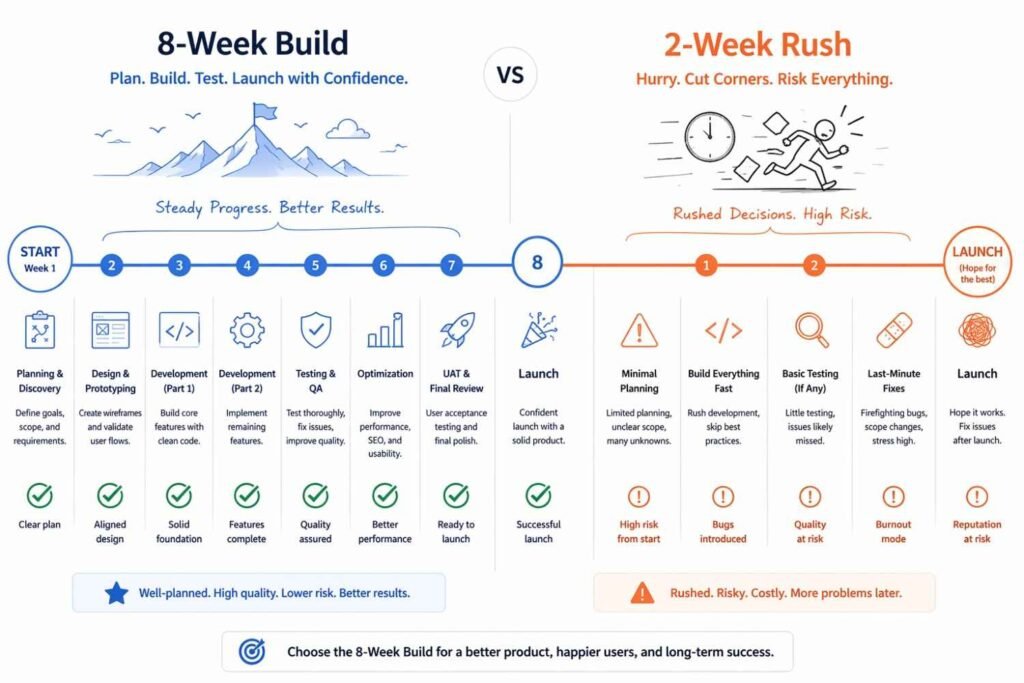
One factor that directly impacts cost but rarely gets discussed upfront is timeline. A dynamic website built over a comfortable 6–8 week timeline will almost always cost less than the same website needed in 2–3 weeks — because rushed projects require developers to work longer hours, compress testing phases, and sometimes pull in additional help. If you’re working to a tight deadline for a product launch, a festival sale, or a business event, communicate that upfront and expect the quote to reflect the urgency. Building in realistic timelines from the start not only saves money but almost always results in a higher-quality final product with fewer bugs and a more polished user experience.
Key takeaway
For most Indian businesses, a well-built dynamic website starts around ₹30,000–₹80,000. But the real question isn’t just “how much does it cost?” — it’s “how much value will it generate?” A dynamic site that generates leads, processes orders, or retains customers pays for itself many times over.
Conclusion
The cost of a dynamic website is not a fixed number — it’s a reflection of your ambitions, your timeline, and the value you expect it to generate. A small business can get started with a well-built dynamic site for as little as ₹30,000 to ₹80,000. A growing e-commerce brand might invest ₹5,00,000 or more for a platform built to scale. And an enterprise with complex requirements might go well beyond that. But across every budget level, the most important shift in thinking is this: stop asking “how little can I spend?” and start asking “how much will this generate?” A dynamic website that captures leads, processes orders, retains customers, and builds your brand online is not an expense — it’s infrastructure. The businesses that treat their website as a strategic investment rather than a one-time cost are almost always the ones that get the most from it.
FAQ
- What is the cost of a dynamic website?
Dynamic website costs depend on size, features, and the developer/agency:
- Basic dynamic site (CMS, blog, contact form) — ₹15,000–₹40,000 / $300–$1,000
- Business website (custom design, backend, database) — ₹40,000–₹1,50,000 / $1,000–$5,000
- E-Commerce site — ₹80,000–₹5,00,000 / $2,000–$20,000
- Enterprise / complex platform — ₹5L+ / $20,000–$200,000+
Ongoing costs include hosting (₹500–₹5,000/month), domain renewal, SSL, and maintenance.
- How much does a 20-page website cost in India?
For a 20-page dynamic website in India, typical costs are:
- Freelancer: ₹20,000 – ₹60,000
- Small agency: ₹60,000 – ₹1,50,000
- Mid-size agency: ₹1,50,000 – ₹4,00,000
The price varies based on whether you need a CMS (WordPress/custom), custom design, animations, e-commerce, login system, SEO setup, and the agency’s reputation. Always ask for an itemised quote.
- How much does a 5-page website cost?
A 5-page website is very common for small businesses and personal brands:
- Static (HTML/CSS): ₹5,000–₹15,000 / $100–$500
- Dynamic (WordPress/CMS): ₹15,000–₹50,000 / $300–$2,000
- Custom coded dynamic: ₹40,000–₹1,20,000 / $1,000–$5,000
Typical pages: Home, About, Services, Blog, Contact. Adding a booking system or login increases the cost significantly.
- Which website is better? static or dynamic?
Neither is universally better — it depends on your needs:
- Choose Static if: you have a simple brochure site, a portfolio, or a landing page with few updates. Cheaper, faster, and more secure.
- Choose Dynamic if: you need a blog, e-commerce, user accounts, a database, or content that changes frequently.
Verdict: For most growing businesses, a dynamic website (especially with a CMS like WordPress) is the better long-term investment because it’s scalable and easy to update without a developer.
Is NETFLIX STATIC or DYNAMIC?
Netflix is dynamic — and not just a little bit. It’s one of the most sophisticated examples of a dynamic website (and web application) in the world. Every single thing you see when you open Netflix is generated specifically for you, in real time, based on a staggering amount of data that Netflix has collected about your viewing habits, preferences, and behavior.
“Netflix doesn’t just stream shows — it personalizes the entire experience, right down to which thumbnail image it shows you for a title.”
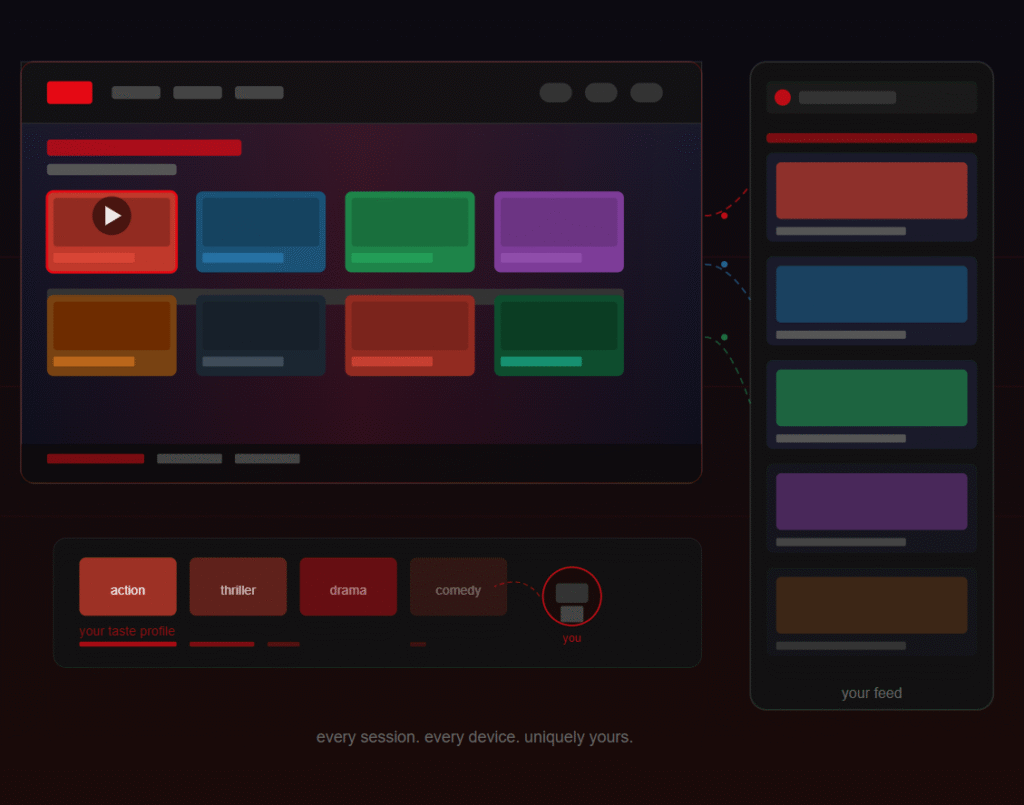
Think about this for a moment: Netflix reportedly has over 1,000 different versions of thumbnails for popular shows. When you browse, Netflix dynamically selects which thumbnail to show you based on what it knows you respond to. If you watch a lot of action films, you might see a thumbnail of a car chase for a title that someone else — who watches more dramas — might see as a romantic still. Same show, completely different image, chosen dynamically for maximum engagement. That level of personalization is only possible because of dynamic systems.
The rows you see on your Netflix homepage are also dynamically generated. “Because you watched Mirzapur,” “Top picks for you,” “Trending now” — none of those are static lists someone manually curated for you. They’re assembled on the fly by Netflix’s recommendation engine every time you open the app, taking into account what you watched recently, what you rated highly, what time of day it is, and even which device you’re using.
Netflix also uses a technique called A/B testing heavily — which is only possible on a dynamic platform. They might show one version of the homepage to half their users and a completely different layout to the other half, then measure which one leads to more viewing time. This kind of real-time experimentation at scale is something only a dynamic system can support.
From a technical standpoint, Netflix uses a microservices architecture with powerful back-end systems, content delivery networks (CDNs) for fast video streaming, and sophisticated APIs that feed dynamic content to every device — whether you’re on a phone, smart TV, browser, or tablet. The content itself is static (the video files don’t change), but everything around it — the interface, recommendations, search results, and personalized rows — is deeply, thoroughly dynamic.
So if someone ever tells you Netflix is a static website, they’re confusing the video files (which are static assets) with the platform itself (which is extremely dynamic). Netflix is actually a benchmark example that people in web development use when explaining what dynamic web applications can achieve at their best.
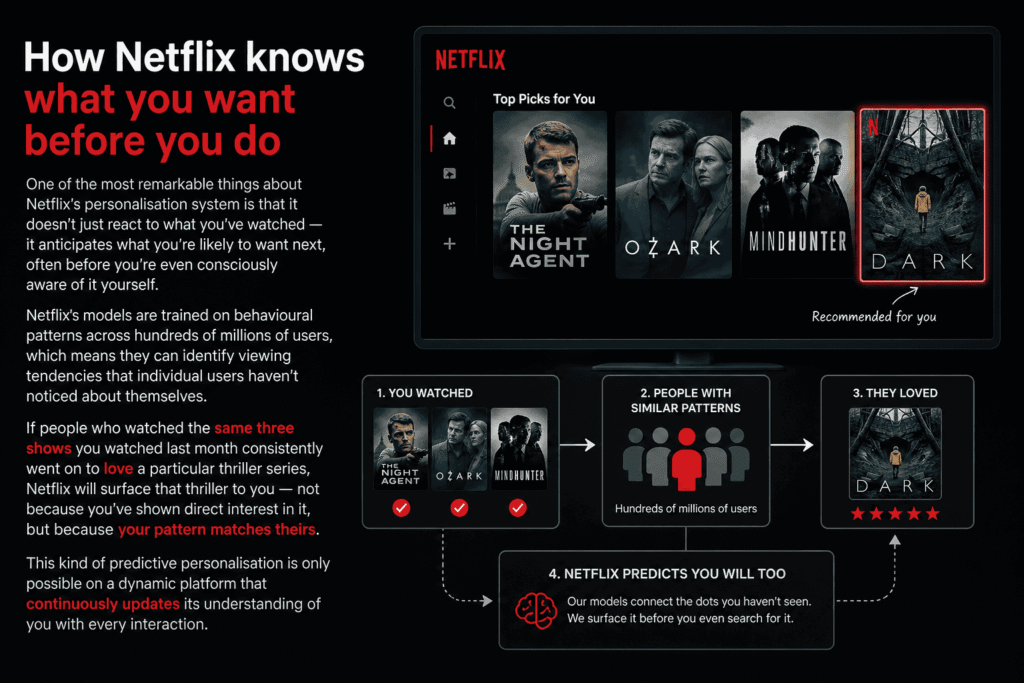
How Netflix knows what you want before you do
One of the most remarkable things about Netflix’s personalisation system is that it doesn’t just react to what you’ve watched — it anticipates what you’re likely to want next, often before you’re even consciously aware of it yourself. Netflix’s models are trained on behavioural patterns across hundreds of millions of users, which means they can identify viewing tendencies that individual users haven’t noticed about themselves. If people who watched the same three shows you watched last month consistently went on to love a particular thriller series, Netflix will surface that thriller to you — not because you’ve shown direct interest in it, but because your pattern matches theirs. This kind of predictive personalisation is only possible on a dynamic platform that continuously updates its understanding of you with every interaction.
The role of time and context in Netflix’s dynamic system
What many people don’t realise is that Netflix’s recommendations don’t just change based on what you’ve watched — they change based on when and how you’re watching. Netflix’s system is context-aware in a surprisingly sophisticated way. On a weekday evening after work, the algorithm might surface shorter episodes or lighter content, predicting you have limited time and energy. On a Saturday afternoon, it might push longer films or binge-worthy series. If you’re watching on a mobile phone, it might prioritise content that works well on a smaller screen with shorter episodes. If you’re on a smart TV at 10pm, it leans toward immersive, cinematic experiences. The same user gets genuinely different recommendations depending on the time, device, and context of each session — all dynamically adjusted in real time.
How Netflix uses viewing completion data
Netflix pays particularly close attention not just to what you start watching, but to how far you get through it — and what you do next. If you watch the first episode of a series and immediately start the second, that’s a powerful positive signal. If you watch 20 minutes of a film and switch to something else, that’s a strong negative signal — even if you never explicitly rated it poorly. If you abandon a show at episode three of eight but come back to finish it two weeks later, the system registers that differently from an immediate abandonment. This granular completion data feeds directly into both your personal recommendations and into Netflix’s broader content acquisition decisions. Shows with high completion rates get renewed and promoted. Shows where most viewers drop off early get quietly buried in the algorithm — or cancelled altogether. The dynamic system essentially uses your behaviour as a continuous real-time vote on every piece of content on the platform.
Why Netflix invests so heavily in personalisation technology
Netflix’s commitment to dynamic personalisation isn’t just about improving user experience — it’s a direct business survival strategy. Unlike traditional broadcasters who could rely on appointment television and mass audiences gathering around the same shows, Netflix competes for attention against every other form of entertainment, social media, gaming, and the entire internet, every single day. The moment a subscriber feels like there’s nothing worth watching, they start questioning whether the monthly subscription is worth it. Netflix’s own research has shown that the vast majority of subscriber cancellations can be traced back to repeated sessions where the user couldn’t find something to watch. Every improvement in recommendation accuracy directly reduces churn — and given that acquiring a new subscriber costs significantly more than retaining an existing one, even a fraction of a percentage point improvement in retention is worth hundreds of millions of dollars annually. Personalisation is not a feature. It is the product.
The dark side of Netflix’s dynamic personalisation
No discussion of Netflix’s dynamic system is complete without acknowledging its more uncomfortable implications. When an algorithm decides what you see, it also decides what you don’t see — and that invisible editorial power shapes culture in ways we’re only beginning to understand. Content that doesn’t perform well in the first 24–48 hours of being surfaced to its initial audience segment gets buried rapidly, regardless of its artistic merit. Niche or challenging content that takes time to find its audience — the kind of work that might have built a loyal following over months on traditional television — can be effectively killed by an algorithm that judges it too quickly against engagement metrics. There’s also the filter bubble concern: if Netflix only ever shows you content similar to what you’ve already watched, it may be quietly narrowing your taste rather than expanding it. Netflix is aware of these tensions and has introduced some “diversity” mechanisms into its recommendation engine, but the fundamental tension between algorithmic efficiency and cultural breadth remains unresolved.
What Netflix’s dynamic system means for the future of entertainment
Netflix’s approach to dynamic personalisation is actively reshaping how content is made, not just how it’s distributed. Because Netflix can measure with extraordinary precision how different audience segments respond to different types of content, it increasingly uses that data to inform commissioning decisions. When Netflix greenlights a new show, it already has detailed data on which audience segments are underserved, which genres have high engagement but low supply, and which combinations of elements — genre, tone, cast type, episode length — predict success with specific viewer profiles. In a very real sense, Netflix’s dynamic back-end doesn’t just personalise the viewing experience — it is beginning to personalise the content itself, producing shows that are algorithmically designed to serve identified gaps in its recommendation ecosystem. This represents a fundamentally new relationship between audience data and creative production — one that traditional studios and broadcasters are only now scrambling to understand and replicate.
Stage 1 — Candidate generation: Algorithms scan the entire Netflix catalogue and produce a shortlist of titles that are plausible matches for you — typically a few hundred out of thousands. Multiple different models run in parallel here, each specialising in a different type of recommendation (similarity to past watches, trending content, new releases from liked genres, etc.).
Stage 2 — Ranking: A ranking model takes those candidates and scores each one against your personal profile to produce a final ordered list. This is where the most computationally intensive personalisation happens.
The signals Netflix tracks
Netflix’s model is built on a remarkably detailed picture of your behaviour:
- Every title you’ve watched and how much of it you completed
- Whether you watched something in one sitting or spread across many sessions
- What time of day and day of week you typically watch
- Whether you re-watched something — a very strong positive signal
- Titles you browsed but never clicked
- Titles you clicked but abandoned within the first few minutes
- Your scroll behaviour on the homepage — how far down you went before choosing
- Whether you used search or browsed to find what you watched
- The device you’re watching on (phone, TV, laptop)
- Your language and subtitle preferences
Notably, Netflix removed its star rating system in 2017 and replaced it with a simple thumbs up / thumbs down — partly because research showed that what people say they like (explicit ratings) is often different from what they actually watch (implicit behaviour). The algorithm trusts your watch behaviour far more than your ratings.
Taste communities
Netflix doesn’t build recommendations purely from your individual history — that would be too slow for new users and too narrow for everyone. Instead, it identifies “taste communities” — clusters of users with similar viewing patterns. You might belong to a group Netflix internally identifies as something like “fans of slow-burn international crime dramas who also watch stand-up comedy.” When a new title proves popular within your taste community, it gets surfaced to you even before you’ve shown direct interest in it.
This is how Netflix can give surprisingly good recommendations for a genre you’ve barely explored — it’s essentially saying “people who watch what you watch also love this.”
The artwork personalisation system in depth
Netflix’s thumbnail personalisation is worth examining closely because it reveals just how granular the system gets. When a piece of content is added to Netflix, a team creates multiple artwork variants — different characters foregrounded, different emotional tones, different visual styles (action-focused, romantic, comedic). The system then runs a multi-armed bandit algorithm, showing different thumbnails to different user segments and measuring click-through rates. Over time, it learns which artwork works best for which taste profiles, and locks in personalised thumbnail assignments. The result is that two people browsing the same title see a fundamentally different first impression of it.
Verdict
Netflix is 100% dynamic. Every row, every thumbnail, every recommendation, and every search result is generated fresh for each user on each visit. It’s one of the most advanced dynamic web platforms in existence, and a perfect example of how dynamic design creates deeply personal user experiences.
Conclusion
Netflix is not just dynamic — it is one of the defining examples of what dynamic technology looks like when it reaches its full potential. From the thumbnail you see on a title to the order of rows on your homepage, from the search results you get to the shows Netflix commissions in the first place, every layer of the experience is shaped by data, algorithms, and real-time personalisation. Netflix proved something important to the entire tech industry: that personalisation is not a feature you add to a product — it is the product. The experience Netflix delivers to you is not the same as the one it delivers to anyone else on earth, and that uniqueness is precisely what keeps 270 million subscribers paying every single month. Whether you’re a web designer, a business owner, or simply a curious viewer, Netflix is the most powerful demonstration available of why dynamic websites don’t just display content — they create experiences.
FAQ
- Why is my Netflix static?
If your Netflix screen appears frozen, distorted, or “static,” this is a technical/device issue, not a website type issue. Common causes and fixes
- Slow internet — run a speed test; Netflix needs at least 3–5 Mbps
- App cache — clear the Netflix app cache on your device
- Outdated app — update the Netflix app to the latest version
- Device restart — restart your TV, phone, or browser
- Netflix server issues — check comto see if Netflix is down globally
- What is the 2-minute rule on Netflix?
Netflix’s “2-minute rule” (also called the “preview rule”) refers to Netflix counting a show or movie as viewed if a user watches at least 2 minutes of it. This view count is used in their reporting (e.g., “X million views in its first week”).
This is why Netflix viewing stats can seem very high — even a 2-minute preview counts as a full view in their official numbers.
- Is Amazon Static or dynamic?
Amazon is dynamic.
Amazon is one of the most advanced dynamic websites ever built:
- Prices change dynamically (sometimes multiple times per day)
- Product recommendations are personalised using ML algorithms
- Search results rank differently per user and per query
- Cart, orders, and wishlist are fully user-specific
- Flash deals and countdown timers update in real-time
- Is Netflix dynamic or static?
Netflix is a dynamic website.
Netflix is built on a microservices architecture with thousands of dynamic components:
- Content rows (Trending, Top 10, Recommended) are personalised per account
- Even the thumbnail images you see for a movie are A/B tested and personalised
- Watch progress is synced in real-time across all devices
- Content availability is dynamic and changes by region and licensing deals
- Why is Netflix cracking?
“Cracking” or pixelated/broken visuals on Netflix are caused by technical issues, not the website type. Possible reasons:
- Low bandwidth — Netflix reduces quality when your internet is slow. Check your speed.
- HDMI cable issue — A loose or faulty HDMI cable can cause visual noise on TVs
- Overheating device — A hot streaming device can degrade video output
- Codec/browser issue — Try a different browser or update your current one
- Display settings — Mismatched resolution between Netflix output and your TV settings
Try: Settings → Playback Settings on Netflix and set quality to High (requires a good connection).