
what are the top 5 Website Builders
Website builders are tools that help users create websites easily without coding. These platforms are popular because they provide templates, drag-and-drop features, and built-in tools for fast website creation. (Jotform)
🔹 1. Wix — Best Overall
- Wix is very easy to use with a powerful drag-and-drop editorIt allows full design freedom and is perfect for beginners and small businesses.
- It also provides AI tools, SEO features, and many templates.
This makes website creation fast and flexible for any type of user.
🔹 2. Squarespace — Best for Design
- Squarespace is known for its modern and stylish templates.
It helps users create professional-looking websites with minimal effort. - It is especially useful for portfolios and creative projects.
The platform focuses more on design quality than flexibility.
🔹 3. WordPress — Best for Customization
- WordPress offers complete control over website design and features.
Users can add plugins and themes to extend functionality. - It is best for blogs and large websites that need scalability.
However, it requires some learning compared to other builders.
🔹 4. Shopify — Best for Online Stores
- Shopify is mainly used for creating e-commerce websites.
It provides tools for payments, products, and order management. - It is ideal for businesses that want to sell products online.
The platform is simple but powerful for online selling.
🔹 5. Weebly — Best for Beginners
- Weebly is simple and easy to use for small websites.
It offers basic drag-and-drop features for quick setup. - It is suitable for students and beginners.
However, it has fewer advanced features compared to others.
Comparison Table
| Website Builder | Best For | Key Feature | Difficulty | ||||||||
| WordPress | Advanced Users | Full Customization | Medium | ||||||||
| Shopify | Businesses | E-commerce Tools | Easy | ||||||||
| Squarespace | Designers | Stylish Templates | Easy | ||||||||
| Wix | Beginners | Drag & Drop + AI | Easy | ||||||||
| Weebly | Beginners | Simple Setup | Very Easy |
3 Website Builders
Website builders are modern tools that help users create professional websites without coding knowledge. They simplify web development by providing drag-and-drop editors, ready-made templates, and built-in features like hosting and SEO tools. These platforms are widely used by students, freelancers, and businesses to build websites quickly and efficiently. Among many options available, three website builders stand out due to their performance, flexibility, and ease of use.
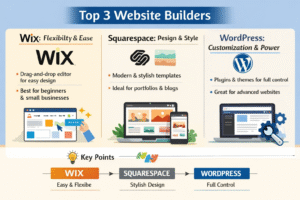
🔹 1. Wix — Flexibility and Ease
- Wix is one of the most popular website builders because of its simple and user-friendly interface.
It uses a drag-and-drop editor that allows users to design websites exactly the way they want without restrictions. - It provides a large collection of templates for different purposes like blogs, business, and portfolios.
Users can customize layouts, colors, fonts, and images easily to match their needs. - Wix also includes advanced features like AI website creation (Wix ADI), SEO tools, and mobile optimization.
These features help users build professional websites quickly and improve their online visibility.
🔹 2. Squarespace — Design and Professional Look
- Squarespace is well-known for its high-quality and modern templates that give websites a stylish appearance.
It is commonly used by designers, photographers, and bloggers who want visually appealing websites. - The platform offers built-in tools for blogging, marketing, and analytics.
This helps users manage their content and track website performance easily. - Although it has slightly less flexibility than Wix, it ensures a clean and professional design.
It is ideal for users who focus more on design quality than customization.
🔹 3. WordPress — Customization and Power
- WordPress is a powerful and widely used platform that supports full website customization.
Users can install plugins and themes to add new features and improve functionality. - It is suitable for blogs, business websites, and large projects that require scalability.
Many popular websites are built using WordPress due to its flexibility and control. - However, it requires some learning compared to Wix and Squarespace.
Once mastered, it offers complete control over website design and performance.
Comparison Table
| Feature | WordPress | Wix | Squarespace | |||||||||
| Ease of Use | Medium | Very Easy | Easy | |||||||||
| Design | Customizable | Flexible | Stylish | |||||||||
| Best For | Advanced Users | Beginners | Designers | |||||||||
| Coding Required | Optional | No | No |
Diagram
Website Builders
↓
———————————
| | |
Wix Squarespace WordPress
| | |
Flexible Stylish Powerful
Additional Important Points
- Website builders reduce the time required to create websites.
They help users launch websites quickly without technical difficulties. - These platforms include built-in hosting and security features.
This ensures that websites are safe and accessible online. - They support mobile-friendly design for better user experience.
This is important as most users access websites through mobile devices. - Each builder has its own strength and purpose.
Choosing the right one depends on user needs like design, flexibility, or control.
Top 5 Websites
In today’s digital world, websites play a very important role in our daily life. People use websites for searching information, communication, learning, shopping, and entertainment. Some websites are more popular than others because they provide useful services, easy access, and reliable information. The top 5 websites are widely used across the world and have millions of active users every day.
🔹 Google — Search Engine
Google is the most popular and widely used website in the world. It helps users find information quickly and accurately by searching the internet. It also provides many services like Gmail for email, Google Maps for navigation, and Google Drive for storage. Because of its speed and accuracy, it is an essential tool for students, professionals, and businesses.
🔹 YouTube — Video Platform
YouTube is the largest video-sharing website used for entertainment and education. Users can watch videos, upload their own content, and learn new skills through tutorials. It covers a wide range of topics such as education, music, gaming, and technology. It is especially useful for students who want to understand concepts through videos.
🔹 Facebook — Social Media
Facebook is a popular social networking website that connects people around the world. Users can share posts, photos, and videos, and communicate with friends and family. It also allows businesses to promote their products and services. Facebook plays a major role in communication and online interaction.
🔹 Amazon — E-commerce Platform
Amazon is one of the biggest online shopping websites in the world. It allows users to buy a wide variety of products from electronics to clothing. It provides features like customer reviews, secure payment methods, and fast delivery. It has made online shopping easy and convenient for people.
🔹 Wikipedia — Knowledge Platform
Wikipedia is a free online encyclopedia that provides information on almost every topic. It is widely used by students, teachers, and researchers for learning and reference. The content is created and updated by users from around the world. It is a reliable source for basic knowledge and quick information.
Table (Summary of Top 5 Websites)
| Website | Type | Purpose | ||||||||||||
| Search Engine | Find information | |||||||||||||
| YouTube | Video Platform | Watch & learn | ||||||||||||
| Social Media | Communication | |||||||||||||
| Amazon | E-commerce | Online shopping | ||||||||||||
| Wikipedia | Knowledge | Learning |
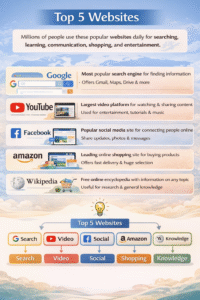
Diagram
Top Websites
↓
——————————————————-
| | | | |
Google YouTube Facebook Amazon Wikipedia
Top 5 Websites – Additional Important Key Points
- Global Reach and Popularity
Websites like Google and YouTube are used worldwide.
They serve millions of users daily across different countries and languages. - Time-Saving Platforms
These websites help users complete tasks quickly and efficiently.
For example, Google provides instant search results, saving time and effort. - Multi-Purpose Usage
Each website serves multiple functions beyond its main purpose.
For example, Amazon is not only for shopping but also for reviews and product comparison. - Content Creation and Sharing
Platforms like YouTube and Facebook allow users to create and share content.
This makes them interactive and engaging for users. - Educational Importance
Wikipedia and YouTube are widely used for learning and research.
They provide free access to knowledge and educational content. - Business and Marketing Use
Many businesses use these platforms for promotion and advertising.
Facebook and Google Ads help companies reach their target audience. - User-Friendly Interface
These websites are designed to be simple and easy to navigate.
Even new users can understand and use them without difficulty. - Regular Updates and Innovation
These platforms continuously update their features and technology.
This improves performance, security, and user experience. - Mobile and App Support
All these websites are available as mobile apps.
This allows users to access services anytime and anywhere.
Best Website Builder Now (2026)
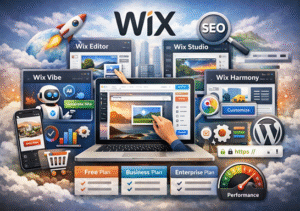
The best website builder currently is Wix
Wix is considered the best because it offers the perfect balance of ease of use, flexibility, design, and advanced features, making it suitable for almost all types of users.
Why Wix is the Best Now
- Best Overall Performance
Wix is ranked as the top website builder due to its powerful features and ease of use.
It performs better than many competitors in flexibility and functionality. (Tom’s Guide) - Beginner-Friendly Platform
Wix is designed for users with no coding knowledge.
Its simple interface helps beginners create websites quickly and easily. - Advanced Design Flexibility
Wix allows users to place elements anywhere on the page.
This gives more creative freedom compared to other builders. (Tom’s Guide) - AI-Powered Website Creation
Wix uses AI tools to automatically generate websites.
This reduces effort and saves time for users. (Creative Bloq) - Large Template Collection
Wix offers thousands of templates for different industries.
Users can easily customize them based on their needs. (TechRadar) - Strong SEO Features
Wix provides built-in SEO tools and guidance.
This helps websites rank better on search engines like Google. - All-in-One Platform
Wix includes hosting, domain, security, and marketing tools.
Users don’t need to depend on multiple services. - E-commerce Capabilities
Wix supports online stores with payment systems and product management.
It is suitable for small and medium business websites. (Tom’s Guide) - Mobile Optimization
Websites created using Wix are mobile-friendly by default.
This improves user experience across devices. - Scalability and Growth
Wix allows users to upgrade plans as their website grows.
It supports both small projects and growing businesses.
🔹 Other Good Options (But Not 1)
- Squarespace
Best for design and modern templates.
Ideal for portfolios and creative websites. (Toolradar) - WordPress
Best for customization and large websites.
Requires more learning but offers full control. (Tom’s Guide)
📊 Quick Comparison Table
| Builder | Best For | Strength | ||||
| Wix | Overall | Easy + Flexible + AI | ||||
| Squarespace | Design | Stylish Templates | ||||
| WordPress | Advanced | Full Customization |
Diagram – Best Website Builder (Wix)
Best Website Builder
↓
Wix
↓
———————————————————————-
| | | | | |
Easy AI Templates SEO E-commerce Apps
Use Tools Design Tools Support Market
Flowchart (Process)
Start
↓
Choose Website Builder
↓
Select Wix
↓
Choose Template / Use AI
↓
Customize Website Design
↓
Add Content (Text, Images)
↓
Publish Website
↓
End
Top 10 Most Used Websites – Detailed Explanation
In the modern digital era, websites have become an essential part of everyday life. People use them for communication, learning, entertainment, shopping, and professional growth. The most used websites are popular because they are user-friendly, reliable, and provide multiple services in one place. These platforms are accessed by billions of users worldwide, making them highly important in the internet ecosystem.
🔹 Detailed Information
- Google
Google is the world’s leading search engine that helps users find information instantly.
It also offers services like Gmail, Maps, Drive, and Google Docs, making it a complete digital platform. - YouTube
YouTube is the largest video-sharing platform used for both learning and entertainment.
It allows users to upload videos, watch tutorials, and create content. - Facebook
Facebook connects people globally through posts, messages, and media sharing.
It is widely used for communication, business promotion, and community building. - Instagram
Instagram focuses on visual content like photos, reels, and stories.
It is popular among young users and influencers for branding and creativity. - Twitter
Twitter is used for sharing short messages called tweets.
It is mainly used for news, trends, and public discussions. - WhatsApp
WhatsApp is a messaging platform used for chatting, voice calls, and video calls.
It is widely used for personal and professional communication. - Amazon
Amazon is a leading online shopping platform with a wide range of products.
It provides secure payment, reviews, and fast delivery services. - Wikipedia
Wikipedia is a free knowledge platform with information on almost every topic.
It is widely used for education and quick reference. - LinkedIn
LinkedIn is used for professional networking and job searching.
It helps users connect with companies and build careers. - Netflix
Netflix is a popular streaming platform for movies and series.
It provides entertainment content in different languages and genres.
📊 Understanding Table (Easy to Study)
| Website | Category | Main Function | Why It Is Popular | Users Type | ||||||||
| Search Engine | Search info | Fast & accurate | Everyone | |||||||||
| YouTube | Video | Watch videos | Learning + fun | Students, creators | ||||||||
| Social | Connect people | Easy sharing | All users | |||||||||
| Social | Photos/videos | Trendy content | Youth | |||||||||
| News | Short updates | Real-time info | Public, media | |||||||||
| Messaging | Chat & calls | Simple & fast | Everyone | |||||||||
| Amazon | Shopping | Buy products | Easy delivery | Buyers | ||||||||
| Wikipedia | Knowledge | Information | Free learning | Students | ||||||||
| Professional | Jobs/network | Career growth | Professionals | |||||||||
| Netflix | Entertainment | Movies/shows | High-quality content | Viewers |
Extra Important Points
- These websites are used daily by billions of people worldwide.
- They provide multiple services in one platform.
- They are mobile-friendly and easy to access anytime.
- They support both personal and professional activities.
- They continuously update features for better user experience.
Diagram
Top Websites
↓
————————————————
| | | | | | | | | |
G Y F I T W A W L N

100% Free Website Builders
First, important thing
“100% free” means no cost at all, but most builders still have limitations like ads, subdomain, or limited storage.
🔹 Best 100% Free Website Builders
- Wix
Wix offers a completely free plan with drag-and-drop features and templates.
But it shows Wix ads and uses a Wix subdomain (example: yoursite.wixsite.com). (Enozom) - WordPress (WordPress.com)
WordPress provides a free plan mainly for blogs and content websites.
It includes hosting, but customization and themes are limited. (BloggingBeats) - Weebly
Weebly offers a free plan with simple drag-and-drop tools.
It is easy to use but includes ads and a branded domain. (TechRadar) - Google Sites
Google Sites is one of the truly 100% free builders with no ads.
However, it has very limited design and customization features. (Colorlib) - Webflow
Webflow offers a free plan with advanced design tools.
It is powerful but has limitations like Webflow branding and restricted features. (Cybernews) Understanding Table (Easy to Compare)Website Builder Free Plan Ads Domain Best For Wix Yes Yes Subdomain Beginners WordPress Yes Yes Subdomain Blogging Weebly Yes Yes Subdomain Simple sites Google Sites Yes No Free domain Basic websites Webflow Yes Yes Subdomain Designers Important Note
- Most free website builders are not fully free for business use
- They include:
- Ads on your website
- Limited storage & features
- No custom domain
Only Google Sites is close to truly free without ads, but it is very basic.